
RVTIFCRVTconverter.exe
RVT to IFC converter without Revit®: IFC4 from Revit 2019 to 2027 files, on your own machine
RVT to IFC reads the RVT directly and writes IFC4 with property and quantity sets. The geometry is tessellated, and the report next to the file lists what was omitted.
DDC-RVT-to-IFC-2.0.3-Setup.exe77 MBWindows 10/11 x64DDC Converters 2.0no Revit licence needed
By downloading you agree to the Terms of Use and EULA. Community licence: personal and research use. Licence for commercial use: request a quote.
RVTconverter.exe from the command line. How to convert · Need the licence?One model, every parameter as rows
Turn the model and click any element: on the right you see the row the converter wrote for it, with every parameter. The same table holds all elements at once, ready for Excel, BI or code.
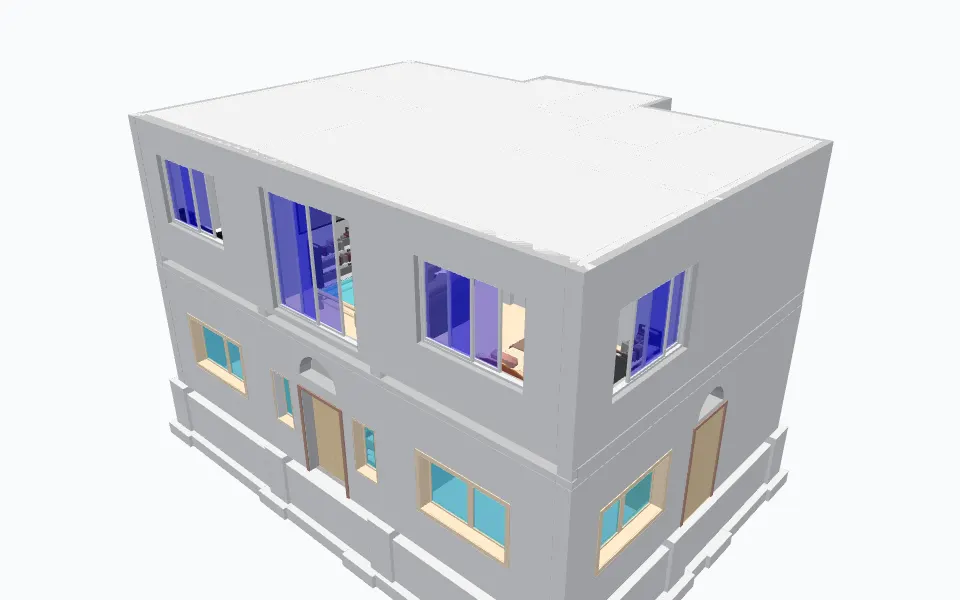
Example row: a wall, ID 308865
- Category
- Walls
- Family
- Basic Wall
- Type Name
- brick 10" wall
- Level
- BASE
- Length
- 7.645
- Width
- 0.279
- Height
- 3.048
- Area
- 19.324
and 17 more parameters in this row.
Sample: home1.rvt by Sudhir Yadav (GitHub: ammysid9), MIT, from github.com. Converted on our build machine with the DDC RVT Converter 2.0.1 (--ifc); every figure here is counted from that output (attribution). The 3D view is the GLB from the same run, linked to elements.xlsx by element ID.
What you get
One IFC4 file per model, profile and options on the command line
Choose a profile for the job: full model, coordination (for example only doors and windows in millimetres from the survey point) or geometry only.
In the output
- IFC4 with tessellated geometry, property sets and quantity sets.
- Profiles full, coordination and geometry; units (--ifc-units), origin (--ifc-origin) and category lists (--ifc-categories, --ifc-exclude-categories).
- Reports that say what was written and what was omitted.
Output files
native_graph.ifcThe IFC4 file.ifc.manifest.json, ifc.settings.jsonWhat was written, and the settings used.Profile--ifc-profile full,coordinationorgeometryOptions--ifc-units mm --ifc-origin survey-point --ifc-categories Doors,Windows
How to convert
Convert from the window, PowerShell or Python
Same converter, same output. Start with the window, then put the command in a batch file, a script or an n8n workflow.
In the window
- Download the Setup.exe or the portable ZIP.
- Start the app, add RVT files and tick IFC.
- Press Convert.
# IFC4 for coordination: millimetres, survey point origin, only doors and windows
> RVTconverter.exe "C:\Models\Project.rvt" --ifc --ifc-profile coordination --ifc-units mm --ifc-origin survey-point --ifc-categories Doors,Windows
import subprocess, pathlib
for f in pathlib.Path(r"C:\Projects").glob("*.rvt"):
    subprocess.run(["RVTconverter.exe", str(f), "--ifc"], check=False)  # exit code 2 = written with reported gaps
Folders of files, nightly runs, checks and reports: n8n workflows that call the converters.
Before you download
What it reads, how we test it, where it stops
Supported versions and formats
- Input
- .rvt and .rfa saved with Revit 2019 to 2027
- Output
- IFC4 (tessellated, not schema-validated by the tool)
- Profiles
- full, coordination, geometry
- Platforms
- Windows 10/11 64-bit (desktop app and command line)
- Revit needed
- No
Supported scope
- Supported scope: the IFC4 is tessellated and not schema-validated by the tool. Check report.json for each run.
- Check the IFC in the software your project uses before production exchange.
- IFC2x3, IFC4.3 and IFCXML are not written by this version.
- Windows 10/11 64-bit only.
A file that does not convert? Send it to us and we add it to the test set.
Reviews
Reviews and a walkthrough
PRACTICAL RAG and LLM SOLUTIONS with Revit and IFC: ChatGPT for Construction Data Management. Plays from youtube-nocookie.com after you click.
With the help of Python and especially the pandas library, as the DataDrivenConstruction team does, we are now able to perform delivery checks four times faster. By turning IFC data into a pandas DataFrame and comparing it with quantification tables or classification databases, we have made our expertise fast and reliable.
 Dmitri GarbuzenkoBIM and AIM Coordinator, RB Rail AS
 Questions
Questions about RVT to IFC
Short answers, including the ones that are no. Where we do not do something, we say what works instead.
All questionsCan I convert RVT to IFC without Revit?
Yes. The converter reads the RVT file directly and writes IFC4 without any Revit installation or licence.
Is there an online RVT to IFC converter?
No, not from us, on purpose. You download the converter and it runs on your PC or your own server, so models are never uploaded.
IFC4 or IFC2x3: which one does it write?
IFC4 only in this version. IFC2x3 and IFC4.3 are not written. The IFC4 geometry is tessellated.
Which Revit versions can it read?
RVT and RFA files saved with Revit 2019 to 2027.
Can it export quantities?
Yes. The IFC4 carries property and quantity sets; the report lists what was omitted.
Can I get an Excel table as well?
Yes. RVT to IFC writes elements.csv beside the IFC, one row per element; RVT Converter with --ifc writes elements.xlsx as well.
Is it free for commercial work?
The Community version is free for personal and research use. Commercial use, including processing files for clients, needs the licence: one payment, perpetual use of the version you have, 12 months of updates, no ads. Request a quote on the licence page.
Related
Other converters, same table shape
- RVTGLBJSONLRevit to Excel converter
Geometry as GLB, every element's saved parameters as JSONL, optional IFC4, and a flat Excel table with one row per element.
- RVTGLBJSONLRevit to GLB converter
GLB geometry for visualisation and game engines, with element IDs that match the parameter data.
- IFCXLSXJSONIFC to Excel converter
Every object, property set and quantity in one Excel workbook, one sheet per kind of data.
- DWGXLSXCSVCAD Drawing to Excel converter
Entities, layers and block attributes from DWG drawings as XLSX, CSV and JSONL, plus DXF and SVG drawings.
Not sure which one? Versions, outputs, command line and smoke test for every input, side by side.
Compare all convertersFree Community version
Turn your next RVT file into IFC
Standalone RVT to IFC4 export for openBIM coordination, with profiles, units, origin and category filters. Free Community version, runs on your computer.
77 MBWindows 10/11 x64runs offline
Licence, team setup or a file that does not convert?
- E-mailinfo@datadrivenconstruction.io
- FormContact form
- CallBook a call
Artem Boiko or an engineer from the DDC team replies by e-mail.