
IFCXLSXDAEIfcExporter.exe
IFC to Excel converter: every entity with its property sets as a row, offline
IFC 2x3, 4 and 4.3 models become one row per entity, with the property set name in each column header. The Snowdon Towers sample gives 7,311 rows and 151 columns.
DDC_Converter_IFC_v28052026.zip74 MBWindows 10/11 x64Linux .debno BIM software licence neededruns offline
By downloading you agree to the Terms of Use and EULA. Community licence: personal and research use. Commercial licence: request a quote.
IfcExporter.exe from the command line. How to convert · Need a commercial licence?| Qto_WallBaseQuantities | ||||||||
|---|---|---|---|---|---|---|---|---|
| ID | Category | ObjectType | GlobalId | Length | Height | Width | NetVolume | |
| 673 | IfcWall | Basic Wall:Concrete 10" | 1Z_D8qyun52938MRTkC1gl | 2.845 | 5.182 | 0.254 | 2.982 | |
| 1524 | IfcWall | Basic Wall:Concrete 12" | 1Z_D8qyun52938MRTkC0PH | 2.883 | 28.575 | 0.305 | 25.034 | |
| 3637 | IfcWall | Basic Wall:Concrete 24" | 3U9u71_MH84e7LZnQseDMe | 3.315 | 5.182 | 0.61 | 10.47 | |
| 27032 | IfcWall | Basic Wall:Concrete 18" | 0B2YGPanTBc9mM6oEg4ile | 3.01 | 5.182 | 0.457 | 7.131 | |
| 27065 | IfcWall | Basic Wall:Concrete 12" | 0B2YGPanTBc9mM6oEg4jI2 | 1.676 | 5.182 | 0.305 | 1.908 | |
| 27206 | IfcWall | Basic Wall:Concrete 18" | 0CKTlg9k54kxOjOSxML2Li | 2.769 | 5.182 | 0.457 | 6.559 | |
| 32480 | IfcWall | Basic Wall:Concrete 18" | 1w7cQHNzPBh8U7J90sHO7e | 2.794 | 5.931 | 0.457 | 6.06 | |
| 7,304 more rows, 143 more columns in the file | ||||||||
One model, every parameter as rows
A model viewer shows one element at a time. The converter output holds every element and every parameter as table rows. Pick a sample, click an element, compare.
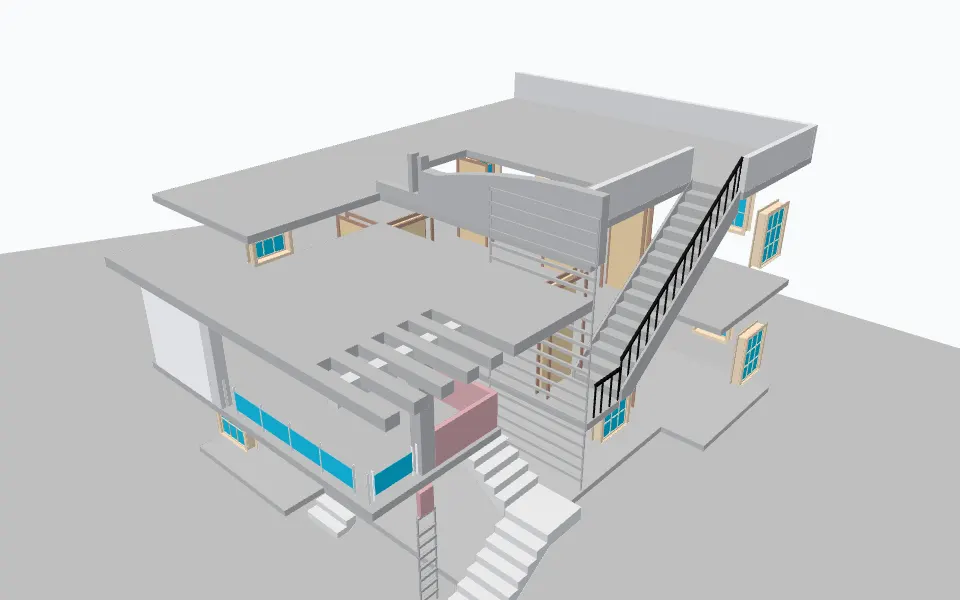
Example row: Stair:Monolithic Stair:196015 (IfcStair, ID 7896)
- ID
- 7896
- Name
- Stair:Monolithic Stair:196015
- Category
- IfcStair
- version
- IFC4
- project
- Project_190
- site
- Surface:218224
- Parent
- Level 4
- ObjectType
- Stair:Monolithic Stair
- GlobalId
- 1UQaw$yP14cg0jpQXiLfru
- OwnerHistory
- 42
- ClassName
- OdIfc4::IfcStair
- Representation
- 7890
- ObjectPlacement
- 7894
- IsDefinedBy
- 7935, 7939, 7942
and 22 more parameters in this row.
Sample: model_190.ifc (2025_BIMfundamentals) by Zijian Wang, Stefan Fuchs, Jiabin Wu, Sebastian Esser, Tamira Wrabel, Andre Borrmann, CC-BY-4.0, from doi.org. Converted on our build machine with the DDC IFC converter, Ad-Free build (IfcExporter.exe); every figure here is counted from that output (attribution).
One row per IFC entity, property sets as column groups
A column header like [Qto_WallBaseQuantities] NetVolume names the property set and the property, so you can filter by either in Excel or pandas.
| Column | Example | What it holds |
|---|---|---|
| ID | 673 | Row ID |
| Category | IfcWall | IFC class |
| ObjectType | Basic Wall:Concrete 10" | Type name from the authoring tool |
| GlobalId | 1Z_D8qyun52938MRTkC1gl | IFC GlobalId, kept for every element |
| [Qto_WallBaseQuantities] Length | 2.845 | Qto_WallBaseQuantities: Length |
| [Qto_WallBaseQuantities] Height | 5.182 | Qto_WallBaseQuantities: Height |
| [Qto_WallBaseQuantities] Width | 0.254 | Qto_WallBaseQuantities: Width |
| [Qto_WallBaseQuantities] NetVolume | 2.982 | Qto_WallBaseQuantities: NetVolume |
Fig. 2. Columns shown in Fig. 1, with values from its first row of SampleBuilding_ifc.xlsx.
Output files
- <name>_ifc.xlsx
- Entities, attributes and property sets.
- .dae
- Collada geometry with matching IDs.
Worked example
What is inside an IFC model, counted in one line of pandas
SampleBuilding.ifc (Autodesk Snowdon Towers sample, IFC4) converts to 7,311 rows and 151 columns. The 8 most frequent IFC classes cover 7,212 of the rows.
IfcBeam alone is 5,288 rows. The 290 IfcWall rows each carry Qto_WallBaseQuantities.
import pandas as pd
df = pd.read_excel("SampleBuilding_ifc.xlsx")
df["Category"].value_counts().head(8)
| Category | Rows | Share |
|---|---|---|
| IfcBeam | 5,288 | 72.3 % |
| IfcSlab | 540 | 7.4 % |
| IfcElementAssembly | 380 | 5.2 % |
| IfcWall | 290 | 4.0 % |
| IfcColumn | 270 | 3.7 % |
| IfcBuildingElementProxy | 250 | 3.4 % |
| IfcOpeningElement | 139 | 1.9 % |
| IfcGrid | 55 | 0.8 % |
| All rows | 7,311 | 100 % |
Fig. 4. Result of the code above on the real output file SampleBuilding_ifc.xlsx.
Convert from the window, PowerShell or Python
Same converter, same output. Start with the window, then put the command in a batch file, a script or an n8n workflow.
In the window
- Install the Microsoft Visual C++ Redistributable 2015-2022 (x64) if it is missing.
- Unzip the download.
- Choose IFC files in the GUI.
- Press Convert.
# XLSX and DAE next to Model.ifc
> IfcExporter.exe "C:\Projects\Model.ifc"
import subprocess, pathlib
for f in pathlib.Path(r"C:\Projects").glob("*.ifc"):
    subprocess.run(["IfcExporter.exe", str(f)], check=True)
> echo "deb [trusted=yes] https://pkg.datadrivenconstruction.io stable main" | sudo tee /etc/apt/sources.list.d/ddc.list
> sudo apt update && sudo apt install ddc-ifcconverter
Supported versions and formats
- Input
- IFC 2x3, 4x1, 4x4, 4x, 4.3
- Not supported
- IFC4X3_RC2 (release candidate schema)
- Output
- XLSX, DAE (Collada)
- Platforms
- Windows 10/11 64-bit (GUI and CLI), Linux (.deb)
Smoke test, 10 public files, Windows 11, 2026-05-28
- Smoke test v18.4.1
- 10 of 10 sample files converted
- GlobalId extraction
- mean 99.95% over 9 files checked with ifcopenshell 0.8.4
- Mean time per file
- 24.6 s
Ten files per format is a smoke test, not a benchmark of every case. Method and sample notes
Limits, stated plainly
- IFC4X3_RC2 (a release candidate schema) is not supported.
- We do not write RVT. Revit can link or open IFC natively.
- Community licence: personal and research use.
Video walkthrough
Revit and IFC Converter: The Future of Data Handling in Construction. Plays from youtube-nocookie.com after you click.
Reviews
Great experience: Until now, I used to open IFC files in Blocknote to check the parameters and their structure. Thanks to the DataDrivenConstruction converter I can check the parameters and see their structure directly in MS Excel in an orderly and SMART way, amazing!
 Valerio SpiniSettore RVCS
 DataDrivenConstruction products revolutionize data management in construction! Their IFC and RVT to Excel converters enable smooth data analysis and extraction, optimizing project management and documentation. A powerful, user-friendly solution for construction professionals (translated from French)
 Nicolas MerotIngénieur BIM, Caeli Ingénierie
 Questions about IFC to Excel
Which IFC schemas are supported?
IFC 2x3, 4x1, 4x4, 4x and 4.3. The release candidate IFC4X3_RC2 is not supported.
Are property sets and quantities kept?
Yes. Each property becomes a column, with the property set in brackets in the header, for example [Qto_WallBaseQuantities] NetVolume.
Is the GlobalId exported?
Yes, as its own column. Checked against ifcopenshell 0.8.4, GlobalId extraction matched at 99.95% on average over 9 files.
Can it convert IFC to RVT?
No. We do not write RVT files. Revit can link or open IFC itself.
Is this an online converter?
No. It is a download that runs on your Windows or Linux computer, or on your own server. Files are never uploaded, so confidential projects stay on your machine.
Is it free for commercial work?
The Community version is free for personal and research use. Commercial use, processing files for third parties, SaaS or redistribution needs a commercial licence. Request a quote on the licence page.
Other converters
- Revit to Excel RvtExporter.exe
- Revit to IFC RVT2IFCconverter.exe
- Revit to DAE RvtExporter.exe
- DWG to Excel DwgExporter.exe
- DGN to Excel DgnExporter.exe
- CAD to Excel: all four inputs compared
Licence, team setup or a file that does not convert?
Write to info@datadrivenconstruction.io, use the contact form or book a call. Artem Boiko or an engineer from the DDC team replies by e-mail.