
RVTGLBJSONLIFCXLSXRVTconverter.exe
Revit® to Excel converter: every element and parameter in one table, without Revit
Open Revit files from 2019 to 2027 without Revit. You get an Excel table with every element and its parameters, a 3D model and, if you want, an IFC file.
DDC-RVT-Converter-2.0.12-Setup.exe80 MBWindows 10/11 x64DDC Converters 2.0no Revit licence needed
By downloading you agree to the Terms of Use and EULA. Community licence: personal and research use. Licence for commercial use: request a quote.
RVTconverter.exe from the command line. How to convert · Need the licence?| ElementId | Category | Type Name | Level | Area | Volume | |
|---|---|---|---|---|---|---|
| 138062 | Walls | Exterior - Brick on Block | Level 1 | 13.61 | 5.68 | |
| 138584 | Walls | Interior - Partition (92mm Stud) | Level 1 | 10.01 | 1.24 | |
| 139234 | Walls | Party Wall - CMU | Level 1 | 11.74 | 5.79 | |
| 140479 | Walls | Foundation - Concrete (417mm) | T/FDN | 11.00 | 4.59 | |
| 140913 | Walls | Foundation - Concrete (435mm) | T/FDN | 5.25 | 2.28 | |
| 141232 | Floors | 127mm Slab on Grade | Level 1 | 64.78 | 8.23 | |
| 260 more rows, 221 more columns in the file | ||||||
One model, every parameter as rows
Turn the model and click any element: on the right you see the row the converter wrote for it, with every parameter. The same table holds all elements at once, ready for Excel, BI or code.
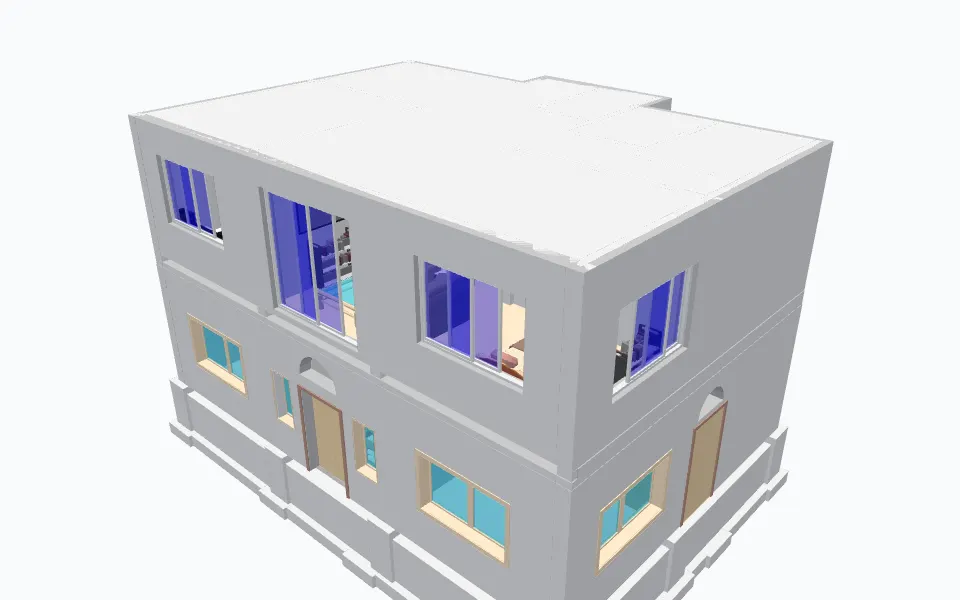
Example row: a wall, ID 138062
- Category
- Walls
- Family
- Basic Wall
- Type Name
- Exterior - Brick on Block
- Level
- Level 1
- ElementId
- 138062
and 63 more parameters in this row.
Model: Duplex.rvt, buildingSMART International, CC BY 4.0 (source). Download the Excel result. Credits
What you get
One row per element, one column per parameter
The flat table has one column per parameter found in the file, so a large model gives thousands of columns. Empty cells mean the element has no such parameter.
Columns in Fig. 1, with real values
| Column | Example | What it holds |
|---|---|---|
| ElementId | 138062 | Revit element ID, the same ID as the GLB node name |
| Category | Walls | Revit category |
| Type Name | Exterior - Brick on Block | Type name |
| Level | Level 1 | Level the element is hosted on |
| Area | 13.61 | Area as stored in the model |
| Volume | 5.68 | Volume as stored in the model |
Fig. 2. Values from the first row of Duplex.xlsx.
For developers: output files
native_graph.glb3D meshes, one node per element, named by ElementId. Always written.summary.json, report.jsonStatus, counts, omissions and per-element diagnostics.properties.jsonlSaved parameters per element, with--properties.native_graph.ifcIFC4, with--ifc.elements.xlsx, elements.csvFlat element table (ElementId, GlobalId, Category, Family, Type Name, Level, quantities, parameters), with--ifc.
In short
- GLB geometry, one node per element, named by the Revit ElementId (always written).
- properties.jsonl: the saved parameters of every element, one JSON object per line (--properties).
- IFC4 with property and quantity sets, profiles full, coordination and geometry (--ifc).
- elements.xlsx and elements.csv, one row per element, written with --ifc; summary.json and report.json list what was read or skipped.
Real output
The output, as it opens
Screens of real converter output from our test files, not mock-ups.
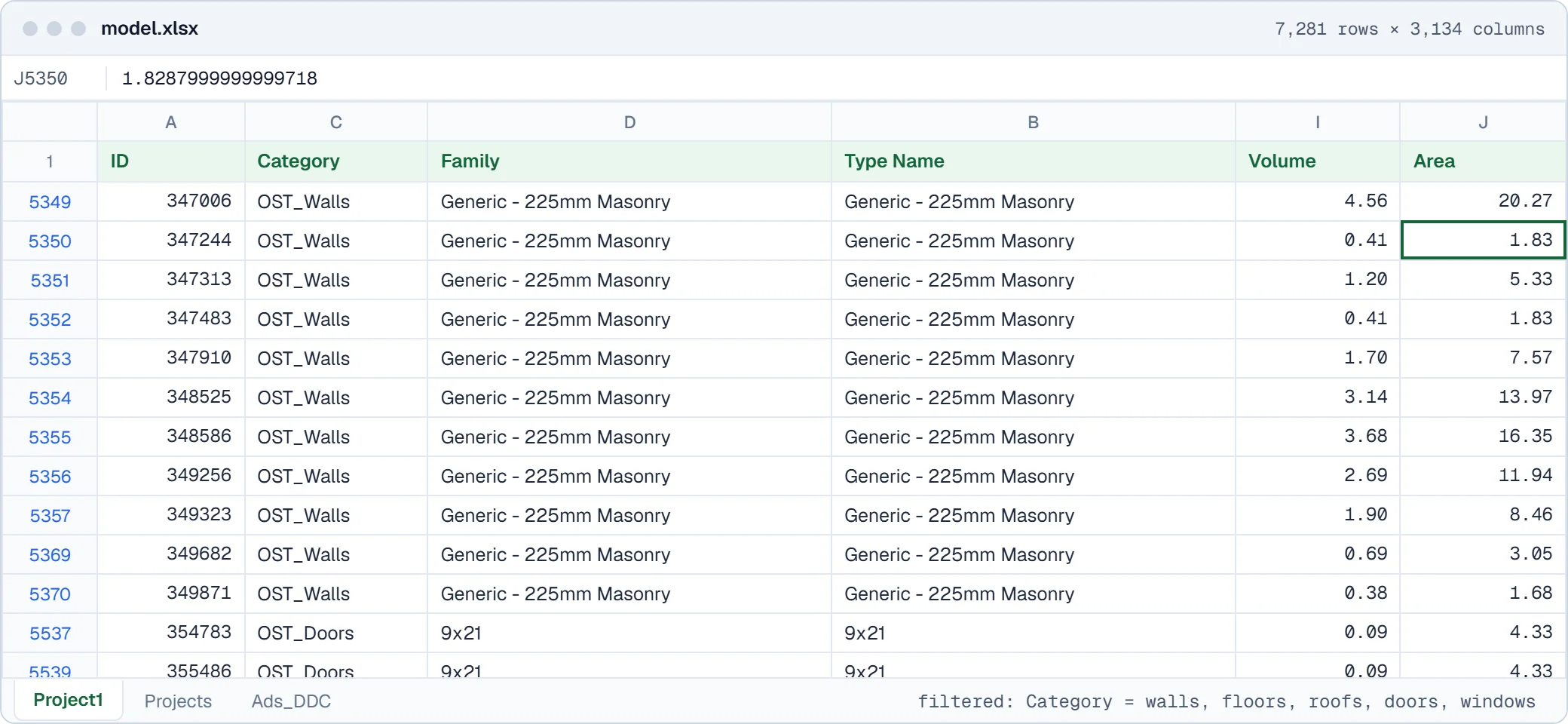
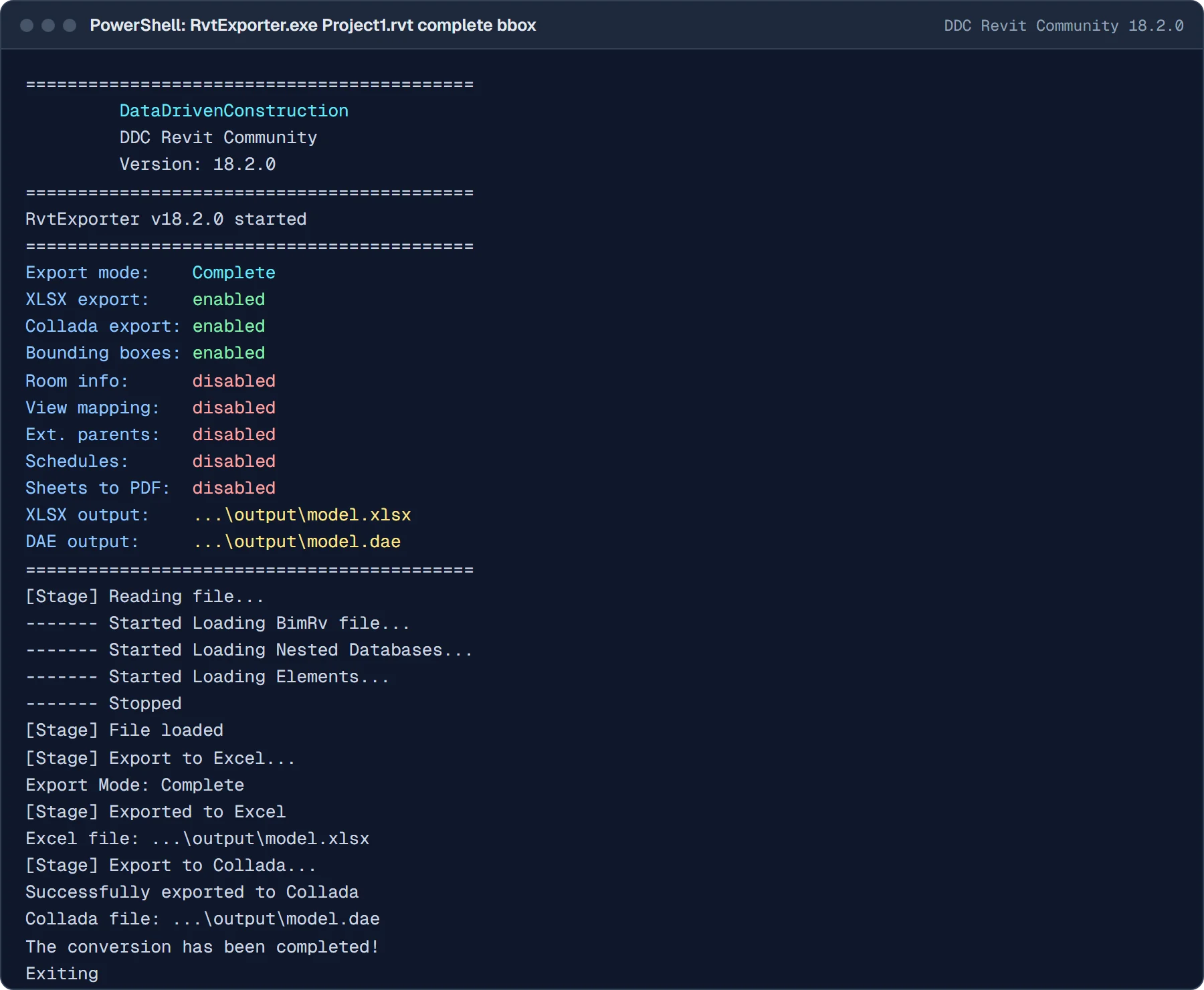
How to convert
Convert from the window, PowerShell or Python
Same converter, same output. Start with the window, then put the command in a batch file, a script or an n8n workflow.
In the window
- Download the Setup.exe or the portable ZIP.
- Start the app, drop the RVT files or a folder into the window.
- Press Convert. A new folder <code><name>.converted</code> appears next to the source file.
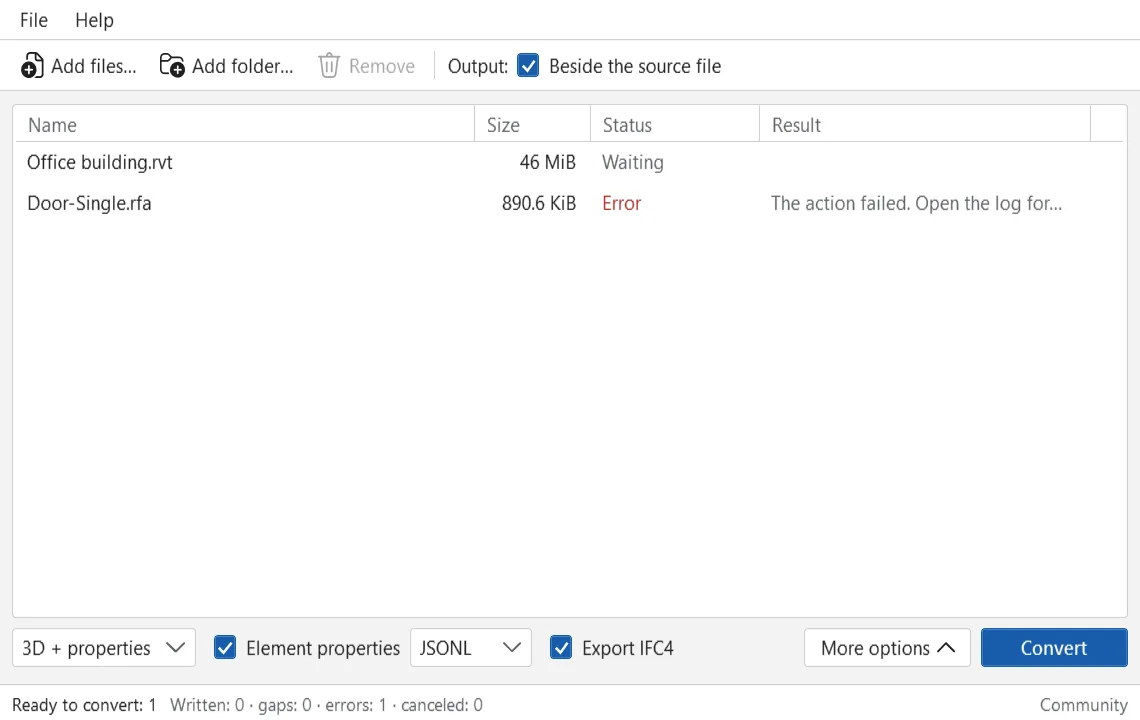
Command line options, RVT Converter 2.0.1
-o DIROutput folder (default: <name>.converted next to the model; existing folders are never overwritten)--propertiesWrite properties.jsonl: the saved parameters of every element--ifcWrite IFC4 as well--ifc-profile full|coordination|geometryWhat goes into the IFC--ifc-units mm --ifc-origin survey-pointIFC units and origin--ifc-categories Doors,WindowsOnly these categories in the IFC--gltf / --objThe same geometry as glTF or OBJ
# GLB, properties.jsonl and IFC4 in C:\Out\Project, plus elements.xlsx and elements.csv
> RVTconverter.exe "C:\Models\Project.rvt" -o "C:\Out\Project" --properties --ifc
import subprocess, pathlib
for f in pathlib.Path(r"C:\Projects").glob("*.rvt"):
    subprocess.run(["RVTconverter.exe", str(f), "-o", str(f.with_suffix("")), "--ifc"])  # elements.xlsx per model
Folders of files, nightly runs, checks and reports: n8n workflows that call the converters.
Before you download
What it reads, how we test it, where it stops
Supported versions and formats
- Input
- .rvt and .rfa saved with Revit 2019 to 2027
- Output
- GLB, properties JSONL, IFC4, JSON reports; glTF and OBJ with
--gltfand--obj; elements.xlsx and elements.csv with--ifc - IFC profiles
--ifc-profilefull, coordination, geometry; units, origin and categories are options- Platforms
- Windows 10/11 64-bit (desktop app and command line)
- Revit needed
- No
Supported scope
- Supported scope: the IFC4 is tessellated, textures are not exported, and the file is not schema-validated by the tool. Check report.json for each run.
- Schedules, PDF sheet export and DGN are not supported.
- We extract data and geometry. We do not convert RVT files between Revit versions.
- Desktop app on Windows 10/11 64-bit; command line also for Linux and macOS (see Download).
A file that does not convert? Send it to us and we add it to the test set.
Reviews
Reviews and a walkthrough
Revit and IFC Converter: The Future of Data Handling in Construction. Plays from youtube-nocookie.com after you click.
DDC converter and Plugin is a fantastic and helpful tool for visualisation and quantification the meta data from Revit. Thanks for sharing such helpful tools!
 Abdelrahim (Mohamed) DeghidyBIM Manager, Consolidated Contractors Company
Questions
Questions about Revit to Excel
Short answers, including the ones that are no. Where we do not do something, we say what works instead.
All questionsWhich Revit versions can it read?
RVT projects and RFA families saved with Revit 2019 to 2027. Older files are not read by the current generation.
Can it downgrade a Revit 2025 file to 2024?
No. We do not convert RVT files between versions. We read the data of any supported version and export it as GLB, JSONL or IFC4. To hand a model to someone on an older Revit, send IFC.
Do I need Revit installed?
No. The converter reads RVT and RFA files without Revit and without a Revit licence.
How do I get an Excel table?
Run the converter with <code>--ifc</code>: elements.xlsx and elements.csv are written beside the IFC, one row per element. The free ddc-tools package can also check, quantity-sum and compare tables: <a href="https://github.com/datadrivenconstruction/cad2data-Revit-IFC-DWG/tree/main/ddc-tools">ddc-tools on GitHub</a>.
What is one row in the Excel table?
One Revit element. Columns are its parameters, plus ID, category, type and level.
Can it read families (RFA)?
Yes. RFA files are converted the same way as project files.
Is this an online converter?
No. It is a download that runs on your own Windows computer. Files are never uploaded, so confidential projects stay on your machine.
Is it free for commercial work?
The Community version is free for personal use and for companies up to 10 conversions a month. Client work, or more conversions, needs the licence: one payment, perpetual use of the version you have, 12 months of updates, no ads. Request a quote on the licence page.
Related
Other converters, same table shape
- RVTIFCRVT to IFC converter
Standalone RVT to IFC4 export for openBIM coordination, with profiles, units, origin and category filters.
- RVTGLBJSONLRevit to GLB converter
GLB geometry for visualisation and game engines, with element IDs that match the parameter data.
- IFCXLSXJSONIFC to Excel converter
Every object, property set and quantity in one Excel workbook, one sheet per kind of data.
- DWGXLSXCSVCAD Drawing to Excel converter
Entities, layers and block attributes from DWG drawings as XLSX, CSV and JSONL, plus DXF and SVG drawings.
Not sure which one? Versions, outputs, command line and smoke test for every input, side by side.
Compare all convertersFree Community version
Turn your next RVT file into GLB
Geometry as GLB, every element's saved parameters as JSONL, optional IFC4, and a flat Excel table with one row per element. Free Community version, runs on your computer.
80 MBWindows 10/11 x64runs offline
Licence, team setup or a file that does not convert?
- E-mailinfo@datadrivenconstruction.io
- FormContact form
- CallBook a call
Artem Boiko or an engineer from the DDC team replies by e-mail.