
DDC Data Viewer · Windows
RVTIFCDWGXLSXDAE
View converter output as a table linked to 3D
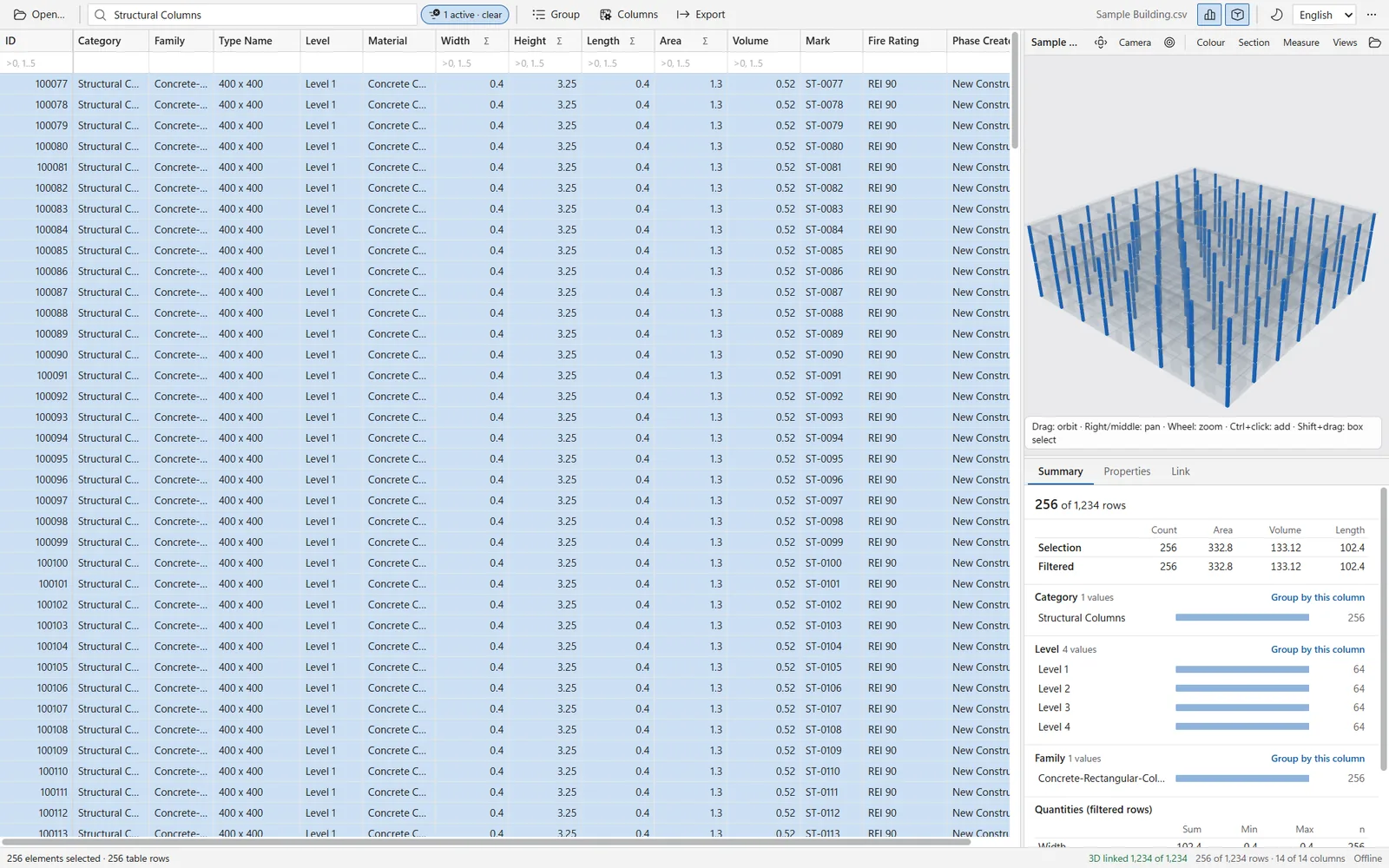
Open the Excel file from the RVT, IFC or DWG converter next to its 3D model. Click a row to see the element, click an element to find the row. Free, offline, no telemetry.
Setup.exe 4.7 MBportable 4.0 MBWindows 10/11 64-bitno admin rights
Windows SmartScreen may show a prompt on first start. Free to use. Components are MIT or Apache-2.0; the notices are in the package.
What it does
A viewer for the table and the model together
The DDC converters write an Excel table and a 3D file for the same model. Data Viewer opens both and keeps them in step.
01
Large tables
Rows and columns are both virtualized and loaded in blocks. 100,000+ rows by 16,000+ columns stay smooth. Pinned columns, column chooser with fill rate, hide empty columns, autosize, keyboard navigation, copy cell or row.
02
Linked 3D
A row click highlights the element, double-click or F frames it, a group click highlights all its elements. A click in 3D selects the row and scrolls to it. Elements outside the filtered rows are ghosted or hidden.
03
Search and filters
Instant search over all columns. A quick filter per column: text, =exact, !exclude, >10, 1..5, (empty). A value checklist with counts, and numeric-aware sort.
04
Group and sum
Group by up to four levels with element counts and sums of the numeric columns you choose, for example Category, Level, Family, Type with Volume and Area.
05
Summary and properties
The summary panel breaks the filtered rows down by category, level, family or layer; a click on a value filters by it. The properties panel shows the non-empty fields of the selected row and copies them as JSON.
06
Export and opening
Export the filtered, sorted view with the visible columns to XLSX or CSV (UTF-8 with BOM). Open files by drag and drop, Ctrl+O, the command line or Open with. Light and dark theme; English, German and Russian interface.
Formats
Tables and geometry it opens
Built for converter output, but any flat table opens. Multi-sheet workbooks open the main sheet (Objects, Elements or the largest) and offer a sheet selector.
Tables
XLSXXLSMXLSXLSBODSCSVTSVJSONLParquet
XLSX, XLSM, XLS, XLSB and ODS workbooks. CSV and TSV detect the delimiter. JSONL is split into sheets by a table, row or kind field and nested objects are flattened. Parquet files open as well.
3D geometry
DAEGLB
COLLADA .dae from the DDC converters (node id equals element ID) and binary glTF .glb (node extras.element_id or name). Geometry next to the table (same file name, same folder, or a conv folder nearby) loads automatically.
- The link column is chosen by matching element keys against every column, so you do not have to name it.
- Rows without geometry, such as views, levels or annotations, have no element in 3D. The status bar says so when you select one.
How linking works
Each row is matched to a 3D element by its ID
The DDC converters write the same element ID into the table and into the geometry. Data Viewer matches the two.
01
Load
Open the table. Data Viewer looks for a .dae or .glb with the same name beside it and loads it.
02
Detect
It tests the element keys of the geometry against every table column and uses the best match as the link column.
03
Select
A row, a group or a filter result highlights its elements. A click in 3D selects the row.
04
Narrow
Filtering and grouping change what is shown in 3D: other elements are ghosted or hidden, as you choose.
Share of table rows linked to a 3D element on our test models
- 100 %Revit model, 3,392 elements
- 99.8 %IFC model 1
- 98.5 %IFC model 2
Measured on three of our own test models. Your result depends on the model and on what the converter wrote into the ID column.
Requirements
Windows 10 or 11, nothing else to install
Data Viewer runs locally. It opens files from disk and sends nothing anywhere.
- System
- Windows 10 or Windows 11, 64-bit
- Runtime
- Microsoft WebView2 (Evergreen). Present on current Windows; the installer downloads the Microsoft bootstrapper only if it is missing
- Installer
- Per-user install, no administrator rights
- Network
- Not needed to use the app. No telemetry
- Packages
- Installer (4.7 MB) and portable ZIP (4.0 MB)
- Licences
- Components under MIT or Apache-2.0; THIRD_PARTY_NOTICES included
- Not supported
- 32-bit Windows
Is it free?
Yes. Data Viewer has no licence gate and no paid edition.
Does it send any data?
No. It has no telemetry and works offline. The only network access is the installer downloading the Microsoft WebView2 bootstrapper, and only when WebView2 is missing.
Windows shows a prompt when I start the installer. Is that expected?
It can appear the first time you run a new download: SmartScreen may show "Windows protected your PC". Check the SHA-256 on the download page against the file, then choose More info and Run anyway.
Do I need Revit, AutoCAD or Excel?
No. Data Viewer reads the files itself. You only need the converter output: a table and, for 3D, a DAE or GLB file.
Why does a row not select anything in 3D?
Not every row is a model element. Views, levels, schedules and other non-geometric records have nothing to show. The status bar says that the row has no 3D element.
How is this different from DDC Viewer on the What's new page?
DDC Viewer is a browser viewer for DWG, IFC and RVT packages with sections and measurements. DDC Data Viewer is a separate Windows app built around large tables linked to 3D.
Which files does it open?
Tables: XLSX, XLSM, XLS, XLSB, ODS, CSV, TSV, JSONL and Parquet. 3D: DAE and GLB.
Is there a Mac or Linux version?
The Windows 10/11 64-bit app on this page is Data Viewer 0.1.2, part of DDC Converters 2.0. There is no macOS or Linux build on this site.
Free
Look at the table and the model together
Free, offline Windows app for DDC converter output. Download the installer or the portable ZIP.
4.7 MB installer4.0 MB portableWindows 10/11 64-bit
Question about Data Viewer or a file that does not open?
- E-mailinfo@datadrivenconstruction.io
- FormContact form
- CallBook a call
Artem Boiko or an engineer from the DDC team replies by e-mail.