
IFCXLSXJSONIFC to Excel
IFC to Excel converter: every entity with its property sets as a row, offline
IFC 2x3 and IFC4 models, also zipped, become one workbook per model: Objects, Properties, Quantities, EffectiveProperties, NormalizedMeasures, relations, units, geometry status and metadata, each on its own sheet, plus result.json. IFC to Excel 2.0.0 turns the open GNI BIM Dataset model 190 into 11 sheets with 170 objects and 550 quantities.
DDC-IFC-to-Excel-2.0.0-portable.zip34 MBWindows 10/11 x64DDC Converters 2.0no BIM software licence needed
By downloading you agree to the Terms of Use and EULA. Community licence: personal and research use. Licence for commercial use: request a quote.
IFC to Excel from the command line. How to convert · Need the licence?| owner_step_id | path | unit_kind | si_value | si_unit | |
|---|---|---|---|---|---|
| 389 | ["Qto_WallBaseQuantities","Height"] | LENGTHUNIT | 3.3 | m | |
| 389 | ["Qto_WallBaseQuantities","Length"] | LENGTHUNIT | 3.113 | m | |
| 389 | ["Qto_WallBaseQuantities","Width"] | LENGTHUNIT | 0.225 | m | |
| 389 | ["Qto_WallBaseQuantities","GrossFootprintArea"] | AREAUNIT | 0.7 | m2 | |
| 389 | ["Qto_WallBaseQuantities","GrossVolume"] | VOLUMEUNIT | 2.311 | m3 | |
| 389 | ["Qto_WallBaseQuantities","GrossSideArea"] | AREAUNIT | 10.271 | m2 | |
| 389 | ["Qto_WallBaseQuantities","NetSideArea"] | AREAUNIT | 9.143 | m2 | |
| 389 | ["Qto_WallBaseQuantities","NetVolume"] | VOLUMEUNIT | 2.057 | m3 | |
| 606 more rows, 18 more columns in the file | |||||
One model, every parameter as rows
Turn the model and click any element: on the right you see the row the converter wrote for it, with every parameter. The same table holds all elements at once, ready for Excel, BI or code.
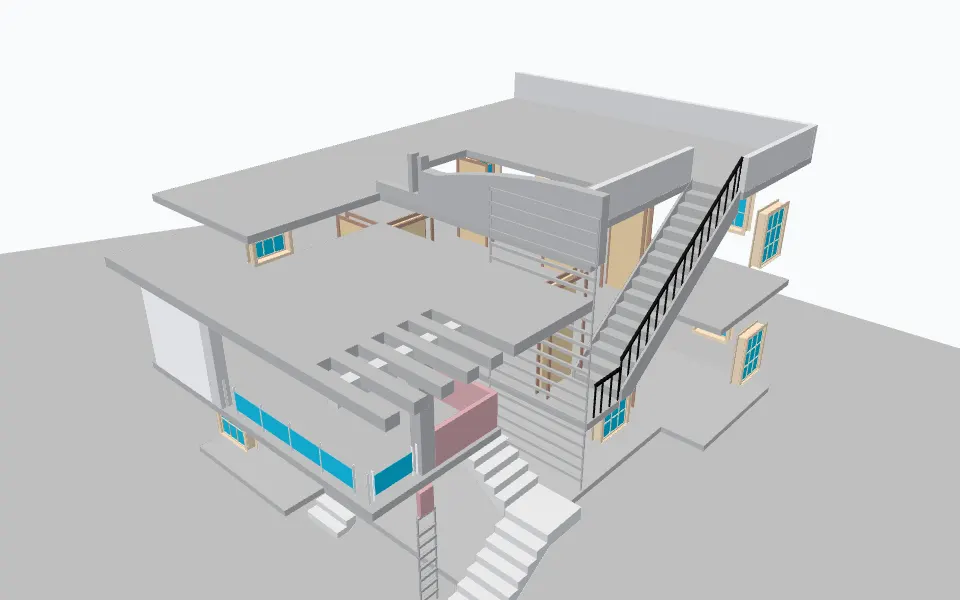
Example row: a wall, ID 5399
- Category
- IfcWall
- Name
- Basic Wall:Party Wall - CMU Residential Unit Dimising Wall:143239
- PSet_Revit_Dimensions.Length
- 17.383
- PSet_Revit_Type_Other.NominalLength
- NominalLength
- ID
- 5399
- GlobalId
- 2O2Fr$t4X7Zf8NOew3FKau
- ElementId
- 143239
- Tag
- 143239
and 61 more parameters in this row.
Model: Duplex_A_20110907.ifc, buildingSMART International, CC BY 4.0 (source). Real output of the DDC IFC to Excel 2.0.0. Credits
What you get
One sheet per kind of data, linked by the STEP id
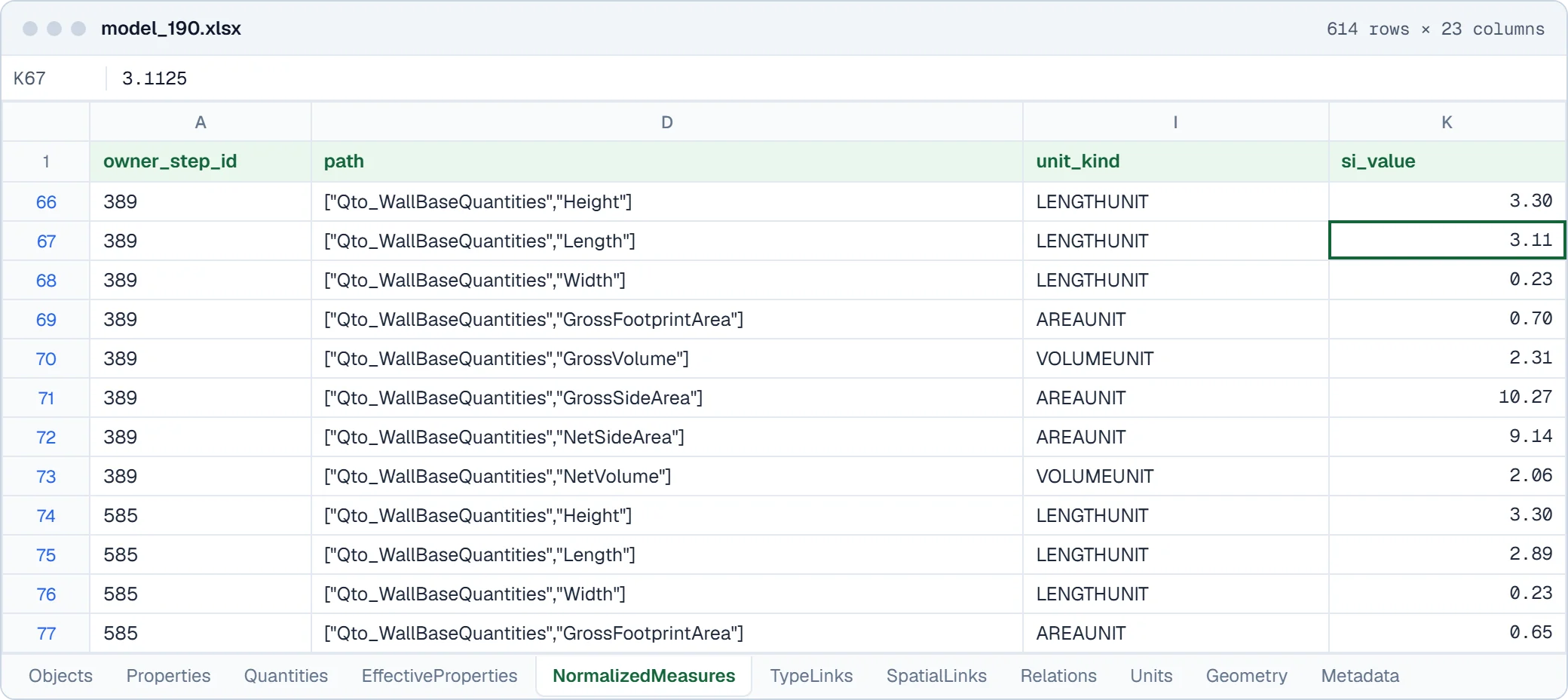
Objects holds one row per IFC object with its GlobalId and class. Properties and Quantities hold one row per value, with the set name and the owner ID, so a filter or a lookup in Excel or pandas joins them.
Columns in Fig. 1, with real values
| Column | Example | What it holds |
|---|---|---|
| owner_step_id | 389 | STEP id of the element the quantity belongs to |
| path | ["Qto_WallBaseQuantities","Height"] | Quantity set and quantity name as a JSON path |
| unit_kind | LENGTHUNIT | Kind of unit |
| si_value | 3.3 | Value converted to SI units |
| si_unit | m | SI unit |
Fig. 2. Values from the first row of model_190.xlsx.
Output files
Name.xlsxObjects, Properties, Quantities, EffectiveProperties, NormalizedMeasures, TypeLinks, SpatialLinks, Relations, Units, Geometry, Metadata.data.jsonlFull entity stream, only with--raw-tablesor for values too long for an Excel cell.result.jsonStatus CONVERTED, CONVERTED_WITH_LIMITS or FAILED, with the details.
In short
- Objects, Properties and Quantities sheets: every object, property and quantity as a row.
- EffectiveProperties and NormalizedMeasures: resolved type and occurrence values, measures in SI units.
- GlobalId preserved for every element; result.json says whether the run was complete or had limits.
- The free ddc-tools package checks, quantity-sums and compares the result.
Worked example
What is inside an IFC model, counted in one line of pandas
model_190.ifc, GNI BIM Dataset (Wang et al., CC BY 4.0), converted with DDC IFC to Excel 2.0.0: the Objects sheet has 170 rows. The 8 most frequent IFC classes cover 132 of them.
import pandas as pd
df = pd.read_excel("model_190.xlsx", sheet_name="Objects")
df["Category"].value_counts().head(8)
Quantities and property sets are on their own sheets, linked to the Objects rows by ID: 38 of the 39 IfcWall objects carry Qto_WallBaseQuantities.
| Category | Rows | Share |
|---|---|---|
| IfcWall | 39 | 22.9 % |
| IfcOpeningElement | 35 | 20.6 % |
| IfcWindow | 19 | 11.2 % |
| IfcDoor | 13 | 7.6 % |
| IfcRailing | 10 | 5.9 % |
| IfcWallType | 7 | 4.1 % |
| IfcBuildingStorey | 6 | 3.5 % |
| IfcSlab | 3 | 1.8 % |
| All rows | 170 | 100 % |
Fig. 4. Result of the code on the real output file model_190.xlsx.
Real output
The output, as it opens
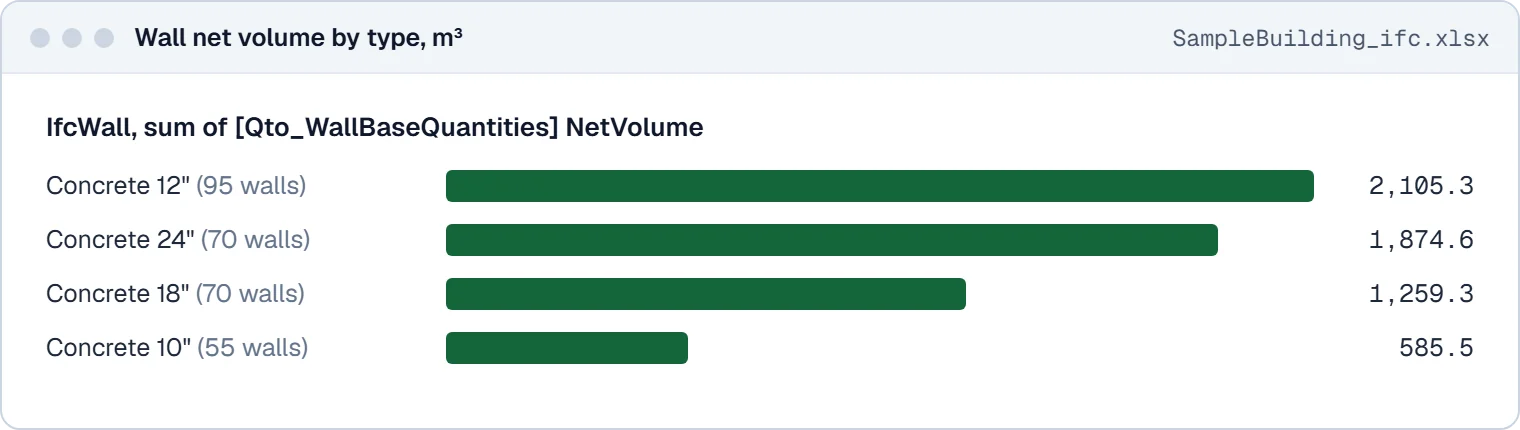
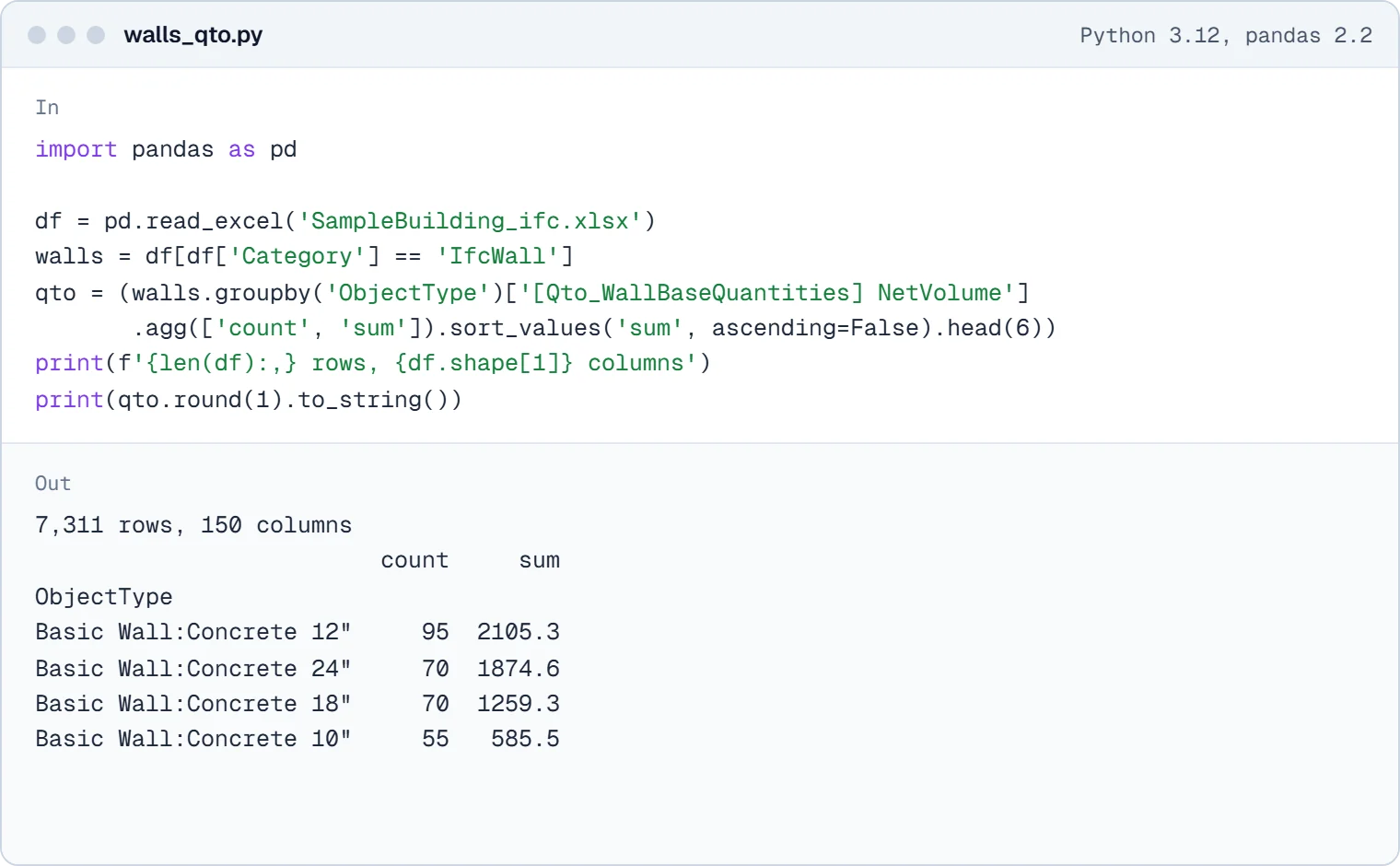
Screens of real converter output from our test files, not mock-ups.
How to convert
Convert from the window, PowerShell or Python
Same converter, same output. Start with the window, then put the command in a batch file, a script or an n8n workflow.
In the window
- Download the portable ZIP and unzip it.
- Start IFC to Excel.exe, drop IFC files or a folder into the window and press Convert.
- Open Name.xlsx in Excel, or the folder in the DDC Data Viewer.
# C:\Out\Building\Building.xlsx and result.json
> & ".\IFC to Excel.exe" "C:\Models\Building.ifc" --output "C:\Out"
import pandas as pd
objects = pd.read_excel(r"C:\Out\Building\Building.xlsx", sheet_name="Objects")
print(objects.groupby("Category").size().sort_values(ascending=False))
Folders of files, nightly runs, checks and reports: n8n workflows that call the converters.
Before you download
What it reads, how we test it, where it stops
Supported versions and formats
- Input
- IFC 2x3 and IFC4, also .ifczip
- Not supported
- IFCXML; computed properties are not qualified
- Output
- XLSX (11 sheets) and result.json; JSONL with --raw-tables
- Platforms
- Windows 10/11 64-bit (portable package)
Supported scope
- Supported scope: IFCXML is not supported and computed properties are not qualified.
- The current version writes data tables only, no geometry file.
- We do not write RVT. Revit can link or open IFC natively.
- Windows 10/11 64-bit only.
A file that does not convert? Send it to us and we add it to the test set.
Reviews
Reviews and a walkthrough
Revit and IFC Converter: The Future of Data Handling in Construction. Plays from youtube-nocookie.com after you click.
Great experience: Until now, I used to open IFC files in Blocknote to check the parameters and their structure. Thanks to the DataDrivenConstruction converter I can check the parameters and see their structure directly in MS Excel in an orderly and SMART way, amazing!
 Valerio SpiniSettore RVCS
 DataDrivenConstruction products revolutionize data management in construction! Their IFC and RVT to Excel converters enable smooth data analysis and extraction, optimizing project management and documentation. A powerful, user-friendly solution for construction professionals (translated from French)
 Nicolas MerotIngénieur BIM, Caeli Ingénierie
 Questions
Questions about IFC to Excel
Short answers, including the ones that are no. Where we do not do something, we say what works instead.
All questionsWhich IFC schemas are supported?
IFC 2x3 and IFC4, plus .ifczip. IFCXML is not supported.
Are property sets and quantities kept?
Yes. The Properties and Quantities sheets have one row per value with the set name, the property name and the owner ID, for example Qto_WallBaseQuantities, NetVolume. NormalizedMeasures gives the same measures in SI units.
Is the GlobalId exported?
Yes, as its own column on the Objects sheet.
Which files does it write?
One workbook Name.xlsx with up to 11 sheets and result.json per model; data.jsonl only with --raw-tables. The free <a href="https://github.com/datadrivenconstruction/cad2data-Revit-IFC-DWG/tree/main/ddc-tools">ddc-tools</a> (check, qto, table, convert) work on them.
Can it convert IFC to RVT?
No. We do not write RVT files. Revit can link or open IFC itself.
Is this an online converter?
No. It is a download that runs on your own Windows computer. Files are never uploaded, so confidential projects stay on your machine.
Is it free for commercial work?
The Community version is free for personal and research use. Commercial use, including processing files for clients, needs the licence: one payment, perpetual use of the version you have, 12 months of updates, no ads. Request a quote on the licence page.
Related
Other converters, same table shape
- RVTGLBJSONLRevit to Excel converter
Geometry as GLB, every element's saved parameters as JSONL, optional IFC4, and a flat Excel table with one row per element.
- RVTIFCRVT to IFC converter
Standalone RVT to IFC4 export for openBIM coordination, with profiles, units, origin and category filters.
- RVTGLBJSONLRevit to GLB converter
GLB geometry for visualisation and game engines, with element IDs that match the parameter data.
- DWGXLSXCSVCAD Drawing to Excel converter
Entities, layers and block attributes from DWG drawings as XLSX, CSV and JSONL, plus DXF and SVG drawings.
Not sure which one? Versions, outputs, command line and smoke test for every input, side by side.
Compare all convertersFree Community version
Turn your next IFC file into XLSX
Every object, property set and quantity in one Excel workbook, one sheet per kind of data. Free Community version, runs on your computer.
34 MBWindows 10/11 x64runs offline
Licence, team setup or a file that does not convert?
- E-mailinfo@datadrivenconstruction.io
- FormContact form
- CallBook a call
Artem Boiko or an engineer from the DDC team replies by e-mail.