
RVTXLSXDAEPDFRvtExporter.exe
Revit® to Excel converter: every element and parameter in one sheet, without Revit
RVT and RFA files from Revit 2015 to 2026 become an XLSX with one row per element. The Autodesk sample project gives 2,496 rows and 1,027 parameter columns.
DDC_Converter_Revit_v28052026.zip210 MBWindows 10/11 x64Linux .debno Autodesk licence neededruns offline
By downloading you agree to the Terms of Use and EULA. Community licence: personal and research use. Commercial licence: request a quote.
RvtExporter.exe from the command line. How to convert · Need a commercial licence?| ID | Category | Type | Level | Area | Volume | |
|---|---|---|---|---|---|---|
| 176804 | OST_Floors | Generic 150mm | Level 1 | 105.906 | 15.886 | |
| 198694 | OST_Walls | SIP 202mm Wall - conc clad | Level 2 | 22.355 | 4.516 | |
| 198749 | OST_Walls | Wall - Timber Clad | Level 1 | 6.010 | 1.214 | |
| 418183 | OST_Floors | Generic 300 | Level 2 | 100.493 | 30.148 | |
| 422466 | OST_Doors | 800 x 2100 | Level 1 | 2.965 | 0.109 | |
| 457479 | OST_Windows | Standard | Level 2 | 5.519 | 0.154 | |
| 2,490 more rows, 1,021 more columns in the file | ||||||
One model, every parameter as rows
A model viewer shows one element at a time. The converter output holds every element and every parameter as table rows. Pick a sample, click an element, compare.
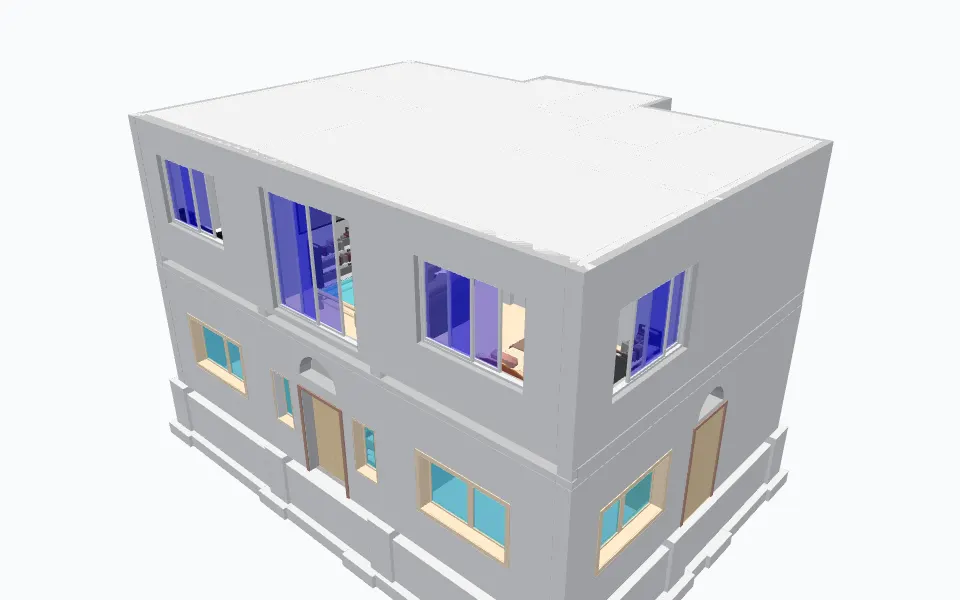
Example row: 1250 x 1325 x 50 (OST_GenericModel, ID 479889)
- ID
- 479889
- Type Name
- 1250 x 1325 x 50
- Category
- OST_GenericModel
- Family
- 1250 x 1325 x 50
- Level
- ROOF
- On the standard 3D View
- true
- Volume
- 19.12518690583766
- Area
- 42.97453182795984
- BoundingBoxMin_X
- -45.366380000112976
- BoundingBoxMin_Y
- 14.838605829243061
- BoundingBoxMin_Z
- 10.999999999998735
- BoundingBoxMax_X
- -42.78435900273763
- BoundingBoxMax_Y
- 17.089261997222074
- BoundingBoxMax_Z
- 18.87401574803023
and 125 more parameters in this row.
Sample: home1.rvt by Sudhir Yadav (GitHub: ammysid9), MIT, from github.com. Converted on our build machine with the DDC RVT converter; every figure here is counted from that output (attribution).
One row per element, one column per parameter
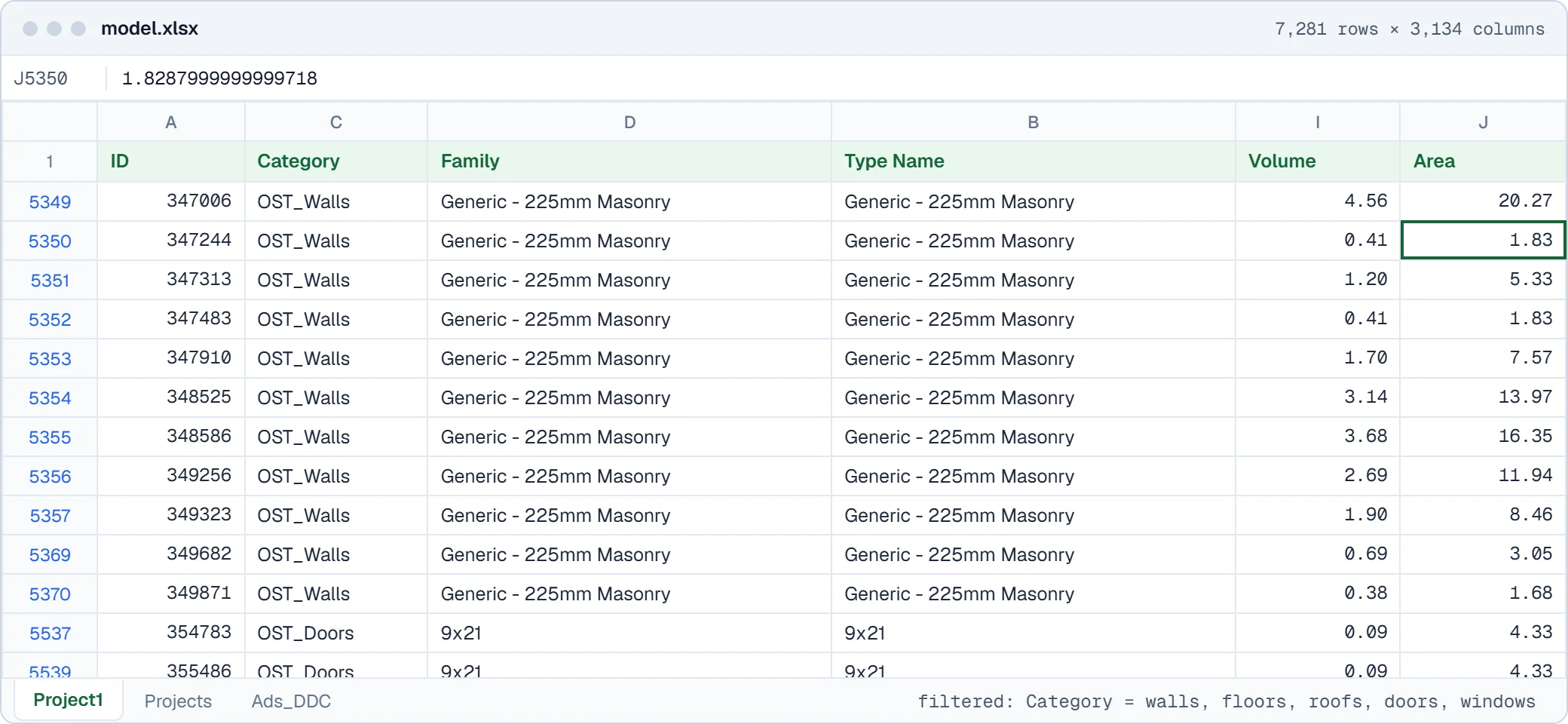
Columns are the union of all parameters in the file, so a model with 2,496 elements produced 1,027 columns. Empty cells mean the element has no such parameter.
| Column | Example | What it holds |
|---|---|---|
| ID | 176804 | Revit element ID, the same ID as in the DAE |
| Category | OST_Floors | Revit category, internal OST_ name |
| Type | Generic 150mm | Type name |
| Level | Level 1 | Level the element is hosted on |
| Area | 105.906 | Area parameter as stored in the model |
| Volume | 15.886 | Volume parameter as stored in the model |
Fig. 2. Columns shown in Fig. 1, with values from its first row of 2023 racbasicsampleproject_rvt.xlsx.
Output files
- <name>_rvt.xlsx
- Elements and parameters. Written next to the source file.
- .dae
- Collada geometry with element IDs. Skip with -no-collada.
- Schedules
- Every Revit schedule, with the schedule option.
- Sheets as PDF, with the sheets2pdf option.
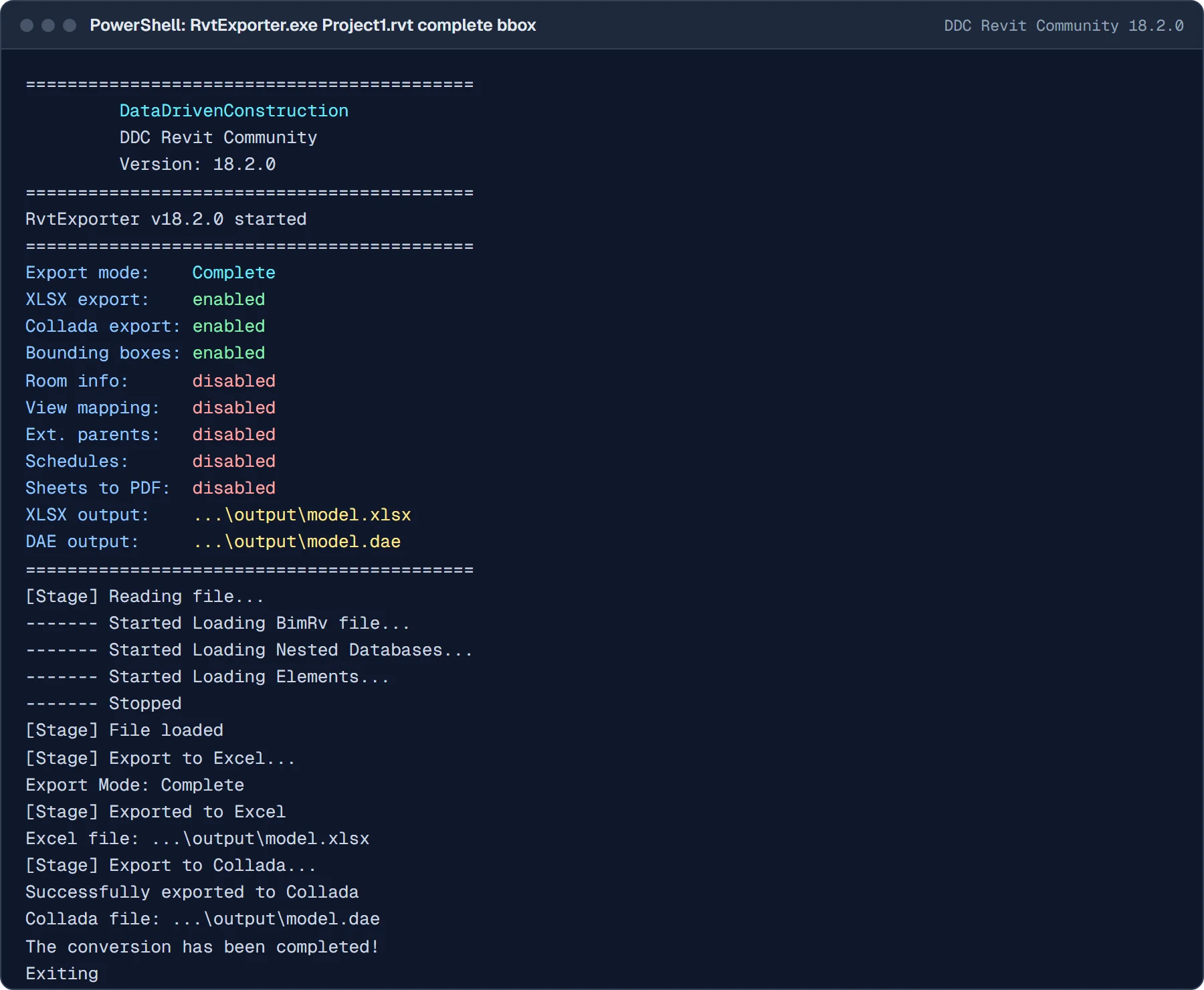
The output, as it opens
Screens of real converter output from our test files, not mock-ups.
Convert from the window, PowerShell or Python
Same converter, same output. Start with the window, then put the command in a batch file, a script or an n8n workflow.
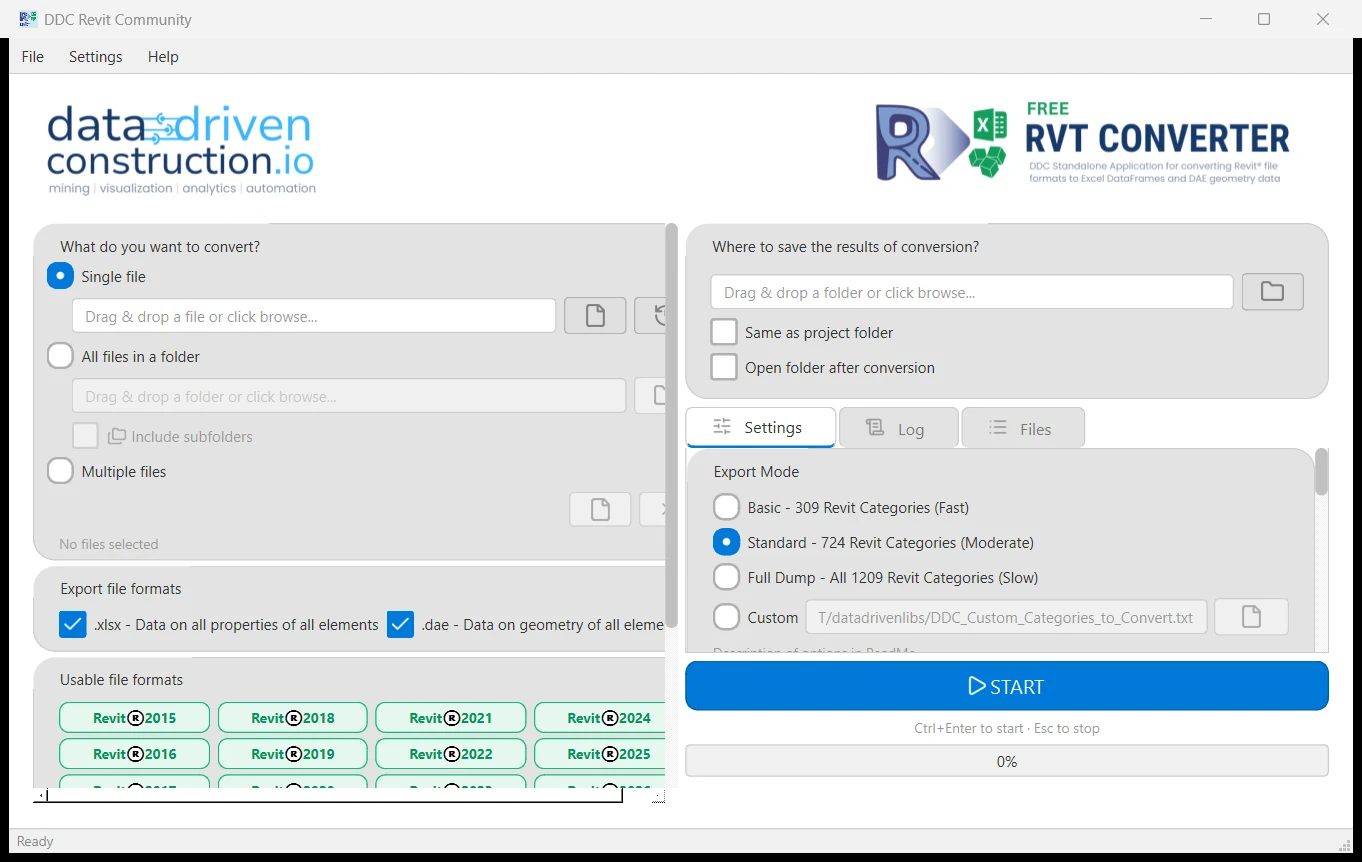
In the window
- Install the Microsoft Visual C++ Redistributable 2015-2022 (x64) if it is missing.
- Unzip the download.
- Start the GUI, choose the RVT files or a folder and the export mode.
- Press Convert. XLSX and DAE appear next to the source file.
# all 1,209 categories, bounding boxes, schedules, PDF sheets
> RvtExporter.exe "C:\Projects\Building.rvt" complete bbox schedule sheets2pdf
import subprocess, pathlib
for f in pathlib.Path(r"C:\Projects").glob("*.rvt"):
    subprocess.run(["RvtExporter.exe", str(f), "standard"], check=True)
> echo "deb [trusted=yes] https://pkg.datadrivenconstruction.io stable main" | sudo tee /etc/apt/sources.list.d/ddc.list
> sudo apt update && sudo apt install ddc-rvtconverter
Supported versions and formats
- Input
- .rvt and .rfa, Revit 2015 to 2026
- Output
- XLSX (elements, parameters), DAE (Collada) geometry, PDF sheets
- Export modes
- basic 309, standard 724, complete 1,209 categories, custom list
- Options
bboxroomschedulesheets2pdf-no-xlsx-no-collada- Platforms
- Windows 10/11 64-bit (GUI and CLI), Linux (.deb)
- Revit needed
- No
Smoke test, 10 public files, Windows 11, 2026-05-28
- Smoke test v18.4.1
- 10 of 10 Revit 2017 to 2024 sample files converted
- Mean time per file
- 148 s
Ten files per format is a smoke test, not a benchmark of every case. Method and sample notes
Limits, stated plainly
- Revit files older than 2015 are not supported (Revit 2012 samples fail by design).
- We extract data and geometry. We do not convert RVT files between Revit versions.
- Windows 10/11 64-bit or Linux. No macOS build.
- Community licence: personal and research use. Commercial use needs a licence.
Video walkthrough
Revit and IFC Converter: The Future of Data Handling in Construction. Plays from youtube-nocookie.com after you click.
Reviews
Revit and IFC reports that used to take me almost weeks to create are now updated in just a few minutes. I was able to quickly understand what the DataDrivenConstruction did and thus extend and modify it to fit projects. The DataDrivenConstruction team showed me examples of blocks and scripts that can automatically generate PDF, XLSX, and DOCX files that mark errors/defects in the model. Additionally, we also now do automatic checks for IFC structure, file naming, etc.
 Daniel GloberBIM-Manager, SCHOLZE-THOST GmbH
 Questions about Revit to Excel
Which Revit versions can it read?
RVT projects and RFA families saved with Revit 2015 to 2026. Older files, for example from Revit 2012, are not supported and fail by design.
Can it downgrade a Revit 2025 file to 2024?
No. We do not convert RVT files between versions. We read the data of any supported version and export it to Excel, IFC or DAE. To hand a model to someone on an older Revit, send IFC.
Do I need Revit installed?
No. The converter reads RVT and RFA files without Revit and without an Autodesk licence.
What is one row in the Excel file?
One Revit element. Columns are its parameters, plus ID, category, type and level. The Autodesk sample project gives 2,496 rows and 1,027 columns.
Can it read families (RFA)?
Yes. RFA files are exported the same way as project files.
Is this an online converter?
No. It is a download that runs on your Windows or Linux computer, or on your own server. Files are never uploaded, so confidential projects stay on your machine.
Is it free for commercial work?
The Community version is free for personal and research use. Commercial use, processing files for third parties, SaaS or redistribution needs a commercial licence. Request a quote on the licence page.
Other converters
- Revit to IFC RVT2IFCconverter.exe
- Revit to DAE RvtExporter.exe
- IFC to Excel IfcExporter.exe
- DWG to Excel DwgExporter.exe
- CAD to Excel: all four inputs compared
Licence, team setup or a file that does not convert?
Write to info@datadrivenconstruction.io, use the contact form or book a call. Artem Boiko or an engineer from the DDC team replies by e-mail.