
RVTIFCRVT2IFCconverter.exe
RVT to IFC converter without Revit®: IFC4 from Revit 2015 to 2026 files, on your own machine
RVT2IFCconverter.exe reads the RVT directly and writes IFC. In our smoke test, 10 public Revit models gave 10 valid IFC4 files of 3.8 to 50 MB.
DDC_Converter_Revit2IFC_v28052026.zip237 MBWindows 10/11 x64Linux .debno Autodesk licence neededruns offline
By downloading you agree to the Terms of Use and EULA. Community licence: personal and research use. Commercial licence: request a quote.
RVT2IFCconverter.exe from the command line. How to convert · Need a commercial licence?One model, every parameter as rows
A model viewer shows one element at a time. The converter output holds every element and every parameter as table rows. Pick a sample, click an element, compare.
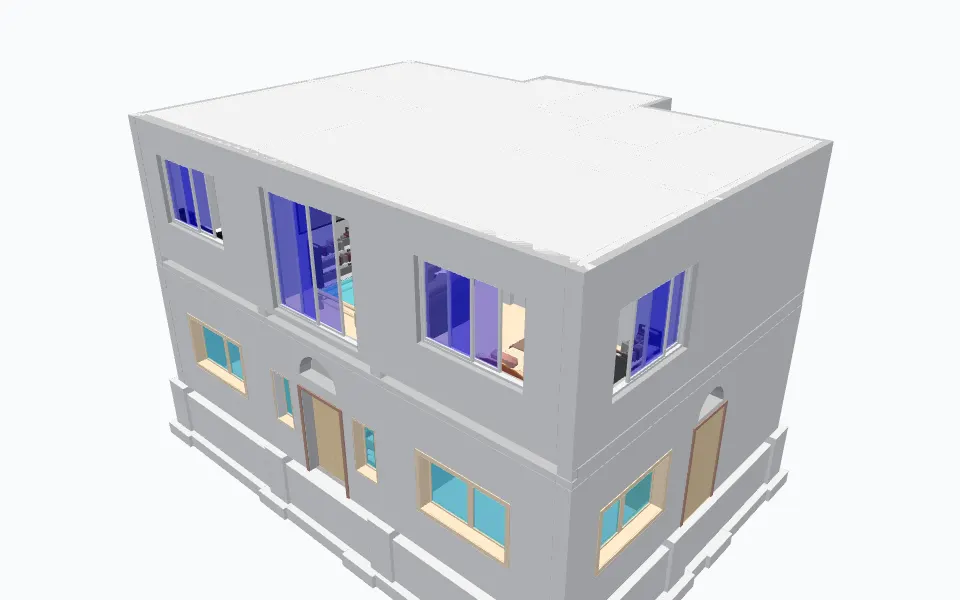
Example row: 1250 x 1325 x 50 (OST_GenericModel, ID 479889)
- ID
- 479889
- Type Name
- 1250 x 1325 x 50
- Category
- OST_GenericModel
- Family
- 1250 x 1325 x 50
- Level
- ROOF
- On the standard 3D View
- true
- Volume
- 19.12518690583766
- Area
- 42.97453182795984
- BoundingBoxMin_X
- -45.366380000112976
- BoundingBoxMin_Y
- 14.838605829243061
- BoundingBoxMin_Z
- 10.999999999998735
- BoundingBoxMax_X
- -42.78435900273763
- BoundingBoxMax_Y
- 17.089261997222074
- BoundingBoxMax_Z
- 18.87401574803023
and 125 more parameters in this row.
Sample: home1.rvt by Sudhir Yadav (GitHub: ammysid9), MIT, from github.com. Converted on our build machine with the DDC RVT converter; every figure here is counted from that output (attribution).
One IFC file per model, preset and options on the command line
The tested output is IFC4: 22k to 415k entities per file in the smoke test. Base quantities and site placement are switched on with config options.
- Tested: IFC4, 10 of 10 smoke-test models valid.
- Also selectable, not yet in the smoke test: IFC2x3, IFC4.3, IFCXML, IFCZIP, HDF5.
- Presets standard, extended and custom.
- Options passed as config, for example ExportBaseQuantities=true; SitePlacement=Shared.
Output files
- model.ifc
- The IFC file, at the output path you give.
- Size in the smoke test
- 3.8 to 50 MB, 22k to 415k entities
- Preset
preset=standard,extendedorcustom- Options
config="ExportBaseQuantities=true; SitePlacement=Shared"
Convert from the window, PowerShell or Python
Same converter, same output. Start with the window, then put the command in a batch file, a script or an n8n workflow.
In the window
- Install the Microsoft Visual C++ Redistributable 2015-2022 (x64) if it is missing.
- Unzip the download.
- Start the GUI, add RVT files and pick a preset and IFC version.
- Press Convert.
# extended preset, base quantities, shared site placement
> RVT2IFCconverter.exe "C:\Projects\Building.rvt" "D:\Output\model.ifc" preset=extended config="ExportBaseQuantities=true; SitePlacement=Shared"
import subprocess, pathlib
for f in pathlib.Path(r"C:\Projects").glob("*.rvt"):
    subprocess.run(["RVT2IFCconverter.exe", str(f), str(f.with_suffix(".ifc"))], check=True)
> echo "deb [trusted=yes] https://pkg.datadrivenconstruction.io stable main" | sudo tee /etc/apt/sources.list.d/ddc.list
> sudo apt update && sudo apt install ddc-rvt2ifcconverter
Supported versions and formats
- Input
- .rvt and .rfa, Revit 2015 to 2026
- Tested output
- IFC4, 10 of 10 valid
- Also selectable
- IFC2x3, IFC4.3, IFCXML, IFCZIP, HDF5 (listed in the README, not yet in the smoke test)
- Presets
- standard, extended, custom
- Options
config="K=V; ...", e.g. ExportBaseQuantities=true; SitePlacement=Shared- Platforms
- Windows 10/11 64-bit (GUI and CLI), Linux (.deb)
- Revit needed
- No
Smoke test, 10 public files, Windows 11, 2026-05-28
- Smoke test v18.4.1
- 10 of 10 valid IFC4 files
- Output size
- 3.8 to 50 MB, 22k to 415k entities
- Mean time per file
- 220 s
Ten files per format is a smoke test, not a benchmark of every case. Method and sample notes
Limits, stated plainly
- Revit files older than 2015 are not supported.
- Only IFC4 is covered by our smoke test so far. Check other schemas in the software your project uses.
- Check the IFC in the software your project uses before production exchange.
- Windows 10/11 64-bit or Linux. No macOS build.
- Community licence: personal and research use. Commercial use needs a licence.
Video walkthrough
PRACTICAL RAG and LLM SOLUTIONS with Revit and IFC: ChatGPT for Construction Data Management. Plays from youtube-nocookie.com after you click.
Reviews
With the help of Python and especially the pandas library, as the DataDrivenConstruction team does, we are now able to perform delivery checks four times faster. By turning IFC data into a pandas DataFrame and comparing it with quantification tables or classification databases, we have made our expertise fast and reliable.
 Dmitri GarbuzenkoBIM and AIM Coordinator, RB Rail AS
 Questions about Revit to IFC
Can I convert RVT to IFC without Revit?
Yes. RVT2IFCconverter.exe reads the RVT file directly and writes IFC without any Revit installation or Autodesk licence.
Is there an online RVT to IFC converter?
No, not from us, on purpose. You download the converter and it runs on your PC or your own server, so models are never uploaded. For a server workflow, run the command line version on a machine you control.
IFC4 or IFC2x3: which one does it write?
The tested output is IFC4: all 10 smoke-test models produced valid IFC4. IFC2x3, IFC4.3, IFCXML, IFCZIP and HDF5 are listed in the README and can be selected, but are not part of the smoke test yet.
Which Revit versions can it read?
RVT and RFA files saved with Revit 2015 to 2026.
Can it export base quantities?
Yes. Pass config="ExportBaseQuantities=true". Options go in one config string, separated by semicolons.
How long does a conversion take?
In the smoke test the mean was 220 s per file on Windows 11, for output files of 3.8 to 50 MB.
Is it free for commercial work?
The Community version is free for personal and research use. Commercial use, processing files for third parties, SaaS or redistribution needs a commercial licence. Request a quote on the licence page.
Other converters
- Revit to Excel RvtExporter.exe
- Revit to DAE RvtExporter.exe
- IFC to Excel IfcExporter.exe
- DWG to Excel DwgExporter.exe
- DGN to Excel DgnExporter.exe
- CAD to Excel: all four inputs compared
Licence, team setup or a file that does not convert?
Write to info@datadrivenconstruction.io, use the contact form or book a call. Artem Boiko or an engineer from the DDC team replies by e-mail.