
New generation · preview, not yet released
Our own DWG, IFC and RVT readers, with a report of what was not decoded
No ODA, RealDWG or Revit API inside. Each file gets a coverage report that counts decoded, partial and unresolved records instead of filling gaps with guesses.
Windows 10/11 x64offlinenot yet code-signedinterface in 20 languages
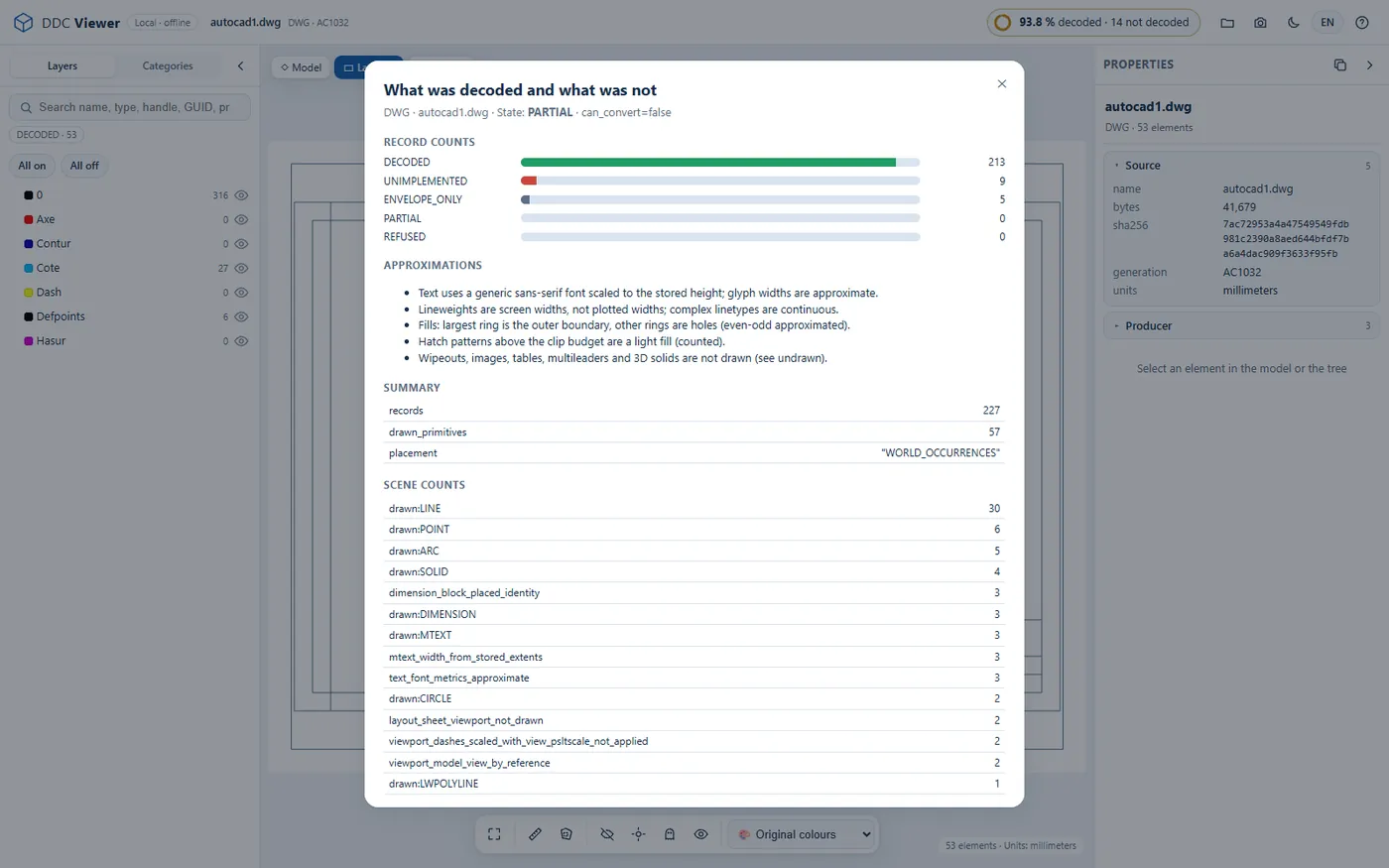
DWG reader: 504 real drawings, 95.9 % of records decoded
DWG to Excel 0.4.1 reads AutoCAD files from R12 to 2018 and later without ODA/Teigha, RealDWG or LibreDWG. The figure is the share of records decoded across the whole test corpus; individual files range from complete to partial, and the report says which.
- Formats read
- AC1009 to AC1032 (R12 to 2018+)
- Test corpus
- 504 real drawings
- Records decoded
- 95.9 % over the corpus
- Writes
- XLSX; optional SQLite, JSONL, DXF, SVG
- Unreadable file
- refused with a message, no partial table
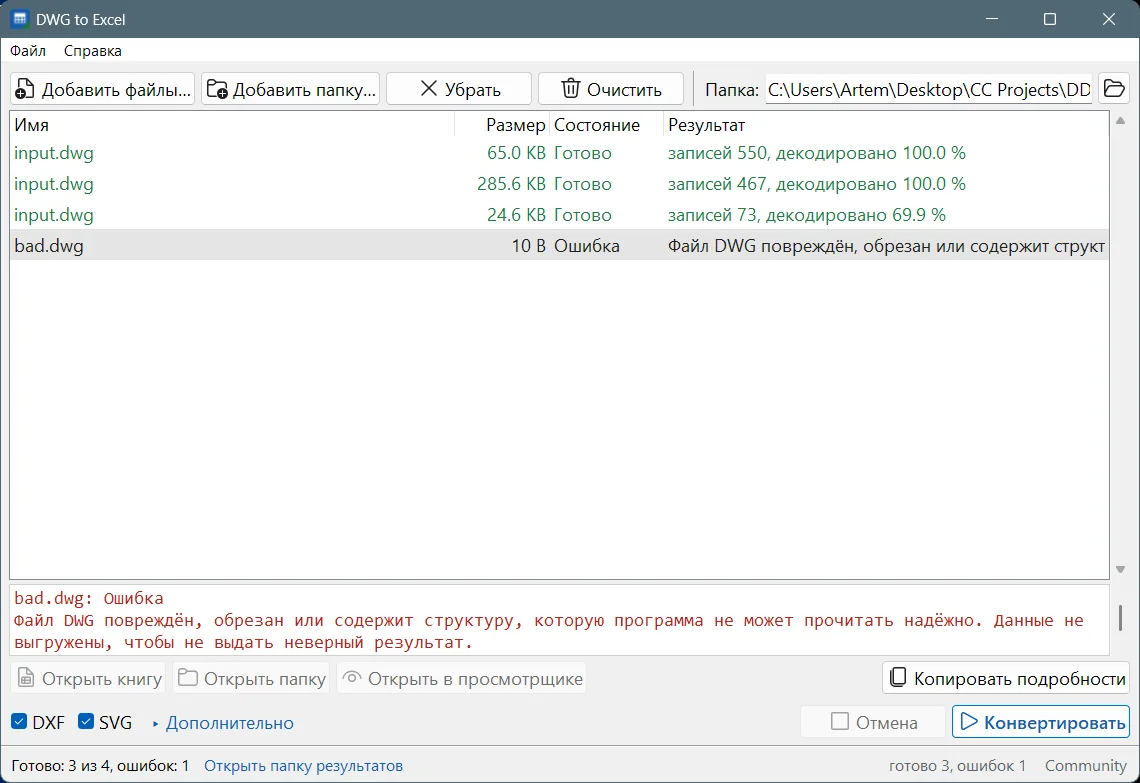
A damaged file gets an error, not a half-filled table
The third row in Fig. 2 decoded 69.9 % of its records, and the status column says so. The fourth file is refused outright. Both cases are written to the log and can be copied with Copy details.
- DXF and SVG. Optional DXF and SVG output next to the workbook for checks and reuse.
- Batch processing. Folders, queue, cancel. Results go into new folders and never overwrite earlier results.
- Visual check. Open the result in DDC Viewer in your browser: layouts, layers, and the properties of each entity.
Six products, all in preview
Versions as of 2026-10-17
| Product | Version | Reads | Writes |
|---|---|---|---|
| DWG to ExcelAutoCAD DWG drawings to structured Excel tables. | 0.4.1 | DWG | XLSX, SQLite, JSONL, DXF, SVG |
| IFC to ExcelIFC models to compact Excel workbooks with properties and quantities. | 0.4.0 | IFC | XLSX, JSON summary, optional JSONL |
| RVT ConverterRevit RVT/RFA to Excel, CSV, SQLite and geometry without Revit. | 0.6.8 | RVT RFA | XLSX, CSV, JSONL, SQLite, geometry, IFC4 |
| Revit to IFCExport Revit models to IFC2X3 / IFC4 for openBIM, standalone. | 0.6.8 | RVT | IFC2X3, IFC4 |
| DDC ViewerLocal browser viewer for DWG, IFC and RVT results. Free. | 1.0 | DWG IFC RVT | PNG screenshots, JSON of selected elements |
| DDC Excel add-inBIM data tools inside Excel: QTO, checks, dashboards, comparison. | preview | XLSX | Excel sheets and charts, JSON, XML, CSV |
IFC to Excel and RVT Converter
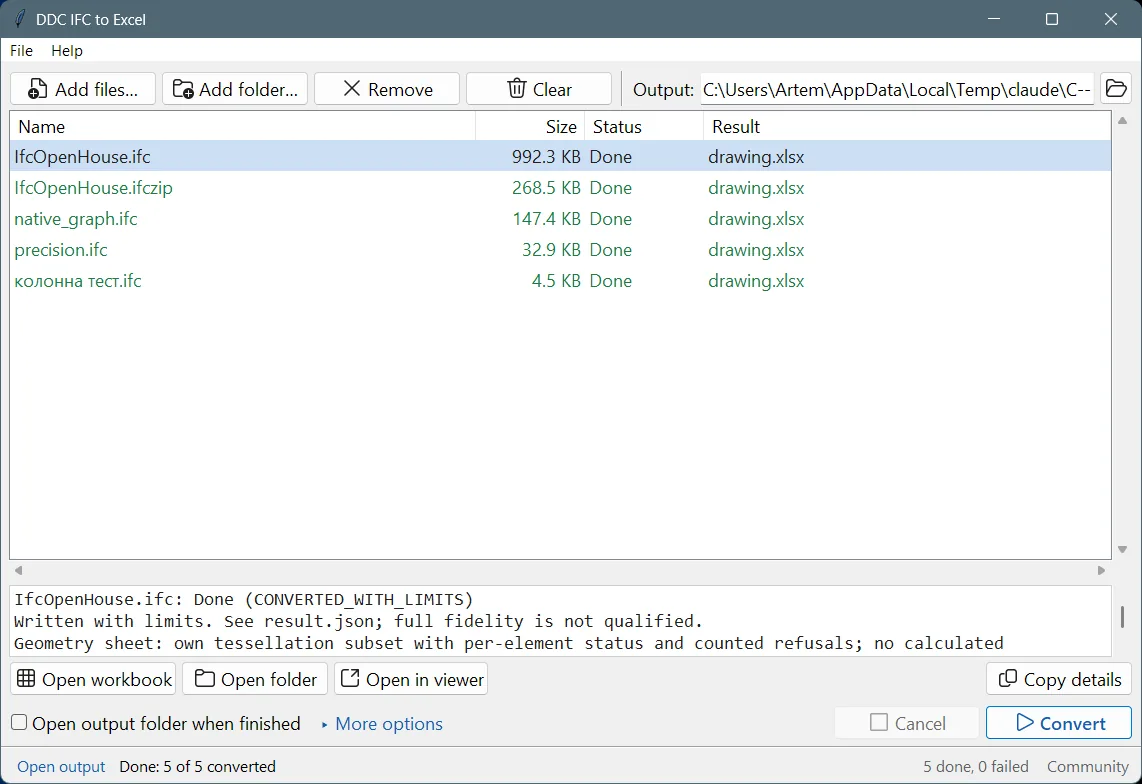
IFC to Excel 0.4.0: one workbook, objects first
Open IFC and IFCZIP models as compact Excel workbooks: objects, property sets, quantities, materials and spatial structure, one row per element.
A 10.9 MB model converts in about 42 s to a 9 MB workbook. The earlier build took 315 s and wrote 460 MB. Reads IFC2X3 and IFC4 as .ifc and .ifczip.
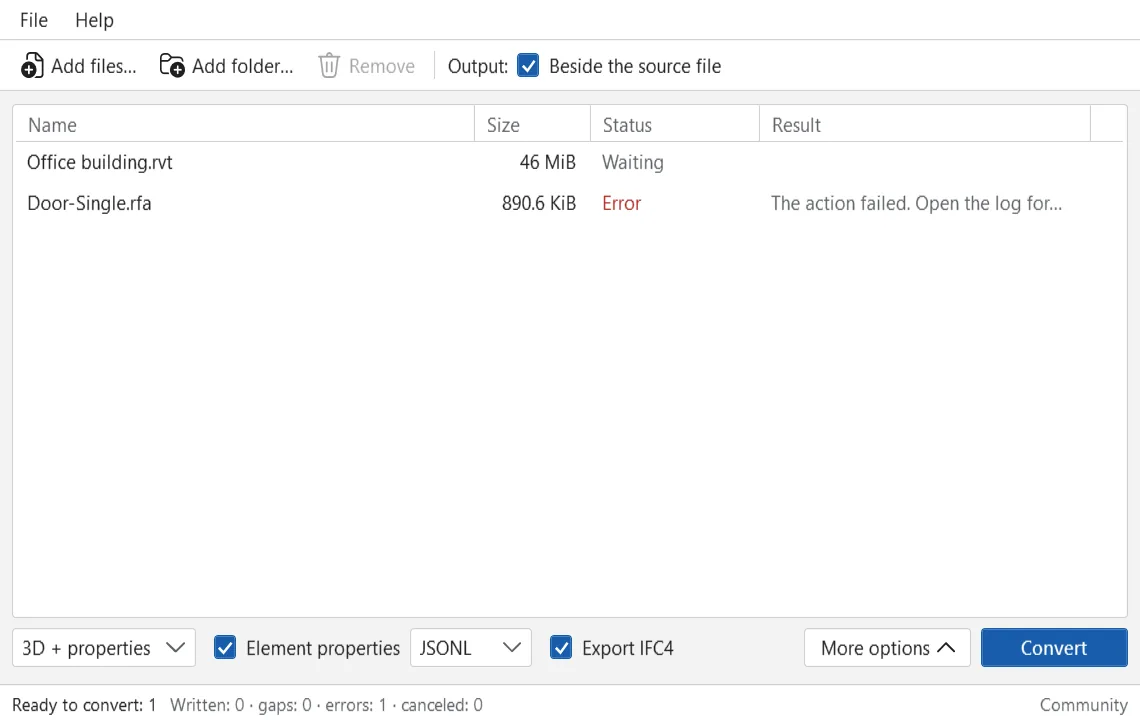
RVT Converter 0.6.8: Revit files without Revit
Read Revit RVT and RFA files without Autodesk Revit: element properties and categories to Excel, CSV or SQLite, plus geometry for review.
Source fidelity is partial in this preview. The report states the detected file version and what was decoded for each file; data that cannot be decoded is listed, never filled in.
Check the result in DDC Viewer before you trust the table
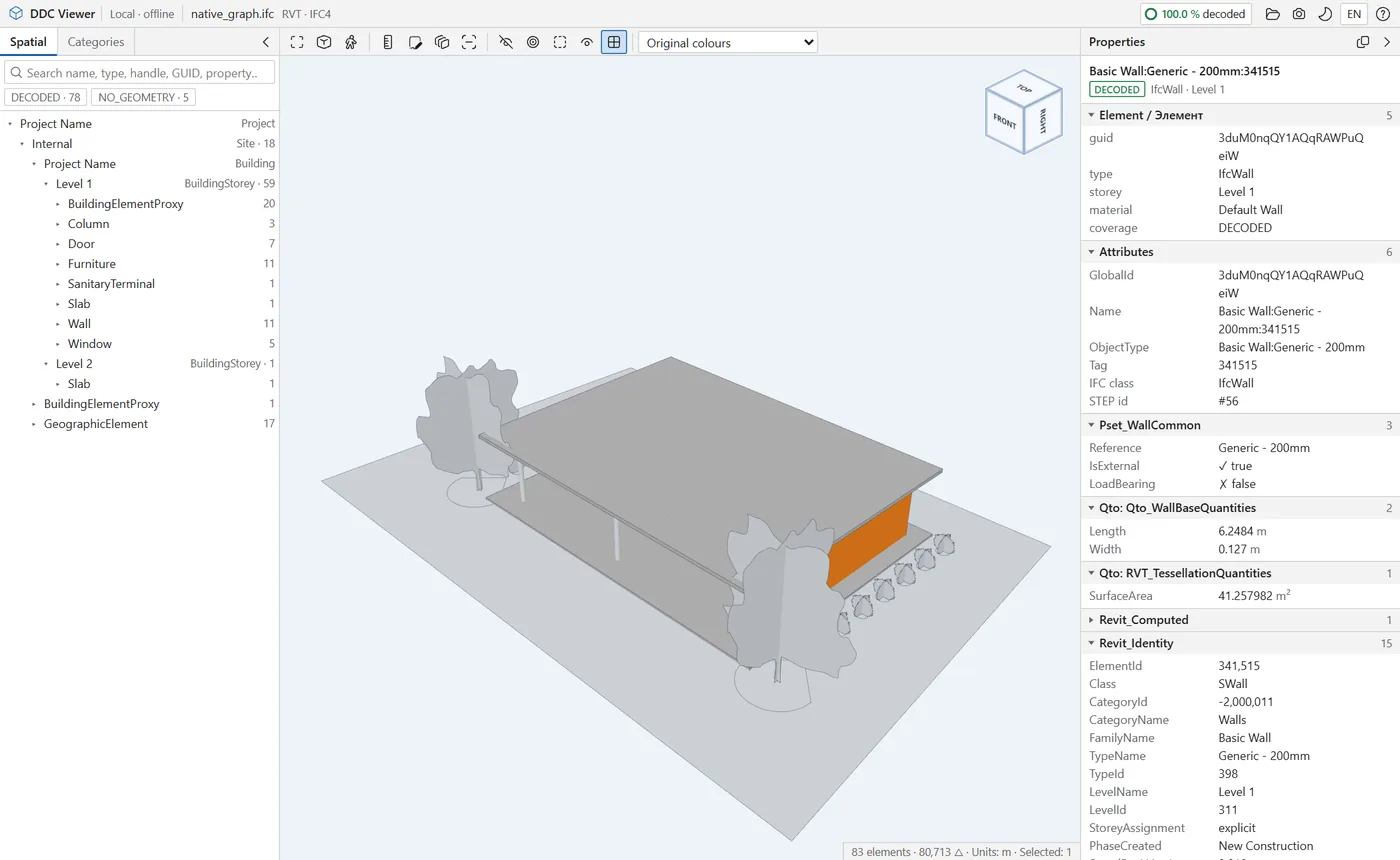
A local, offline viewer that opens in your browser. Check DWG layouts and layers, IFC and RVT models in 3D, and the properties of every element. Free, included with every converter.
- 3D navigation
- Orbit, pan, zoom, view cube, perspective or orthographic, first-person walk.
- Sections and isolation
- Section plane and section box, hide, isolate, X-ray and colour by any property.
- 2D drawings
- Model space and paper-space layouts, viewports, layers, linetypes, hatches and texts.
- Properties
- Grouped property panel with units; copy a value or the whole element as JSON.
- Measurement
- Distances and areas with snapping to endpoints.
- No upload
- One local folder, no server, no internet. Data never leaves your computer.
Revit to IFC 0.6.8: IFC2X3 or IFC4 from an RVT, without Revit
Export Revit RVT models to IFC2X3 or IFC4 for openBIM workflows, coordination and model checking, without opening Revit.
- IFC2X3 and IFC4. Choose the schema your coordination or checking software expects.
- Openings and relations. Openings and wall relations are written where the source is unambiguous; ambiguous cases are excluded explicitly.
- Units checked. Metre and millimetre models are verified before writing.
Preview: validate the IFC in your target software; source fidelity is partial. The released Revit to IFC converter from the cad2data line is on its own page.
Excel add-in, next version
An Excel add-in for working with model data: import converter results, run quantity take-off, check parameters with rules, build dashboards and compare versions. Preview: the installer will be published after code signing. The current add-in and its download are on the Excel add-in page.
Requirements and status
Applies to all six products
- Windows 10 (22H2) or Windows 11, 64-bit
- 8 GB RAM; 16 GB for large models
- 1 GB free disk space plus space for results
- Microsoft Excel or any XLSX viewer to open workbooks
- Internet only for licence activation (Paid); conversion works offline
All products on this page are previews: tested on our machines, not yet code-signed and not yet released for production. Downloads open when a product passes release checks.
Licence terms will follow the licence page: the Community version is for personal and research use; commercial use needs a commercial licence.
Want a preview build for your files?
Write to info@datadrivenconstruction.io, use the contact form or book a call. Artem Boiko or an engineer from the DDC team replies by e-mail.