
DDC Excel Add-in 2026.10.0 · Windows
RVTIFCDWGXLSX
Excel add-in for RVT, IFC and DWG data
Import a model into a workbook, one row per element, then check parameters, take off quantities, find empty columns and build dashboards without leaving Excel.
Excel 2016 or newerWindows 10/11 x64DDC-Excel-AddIn-2026.10.0-unsigned.zipno Revit or CAD software needed
By downloading you agree to the Terms of Use and EULA. Above 10 conversions a month in a company, or for client work, use needs the licence, quoted on request.
What it does
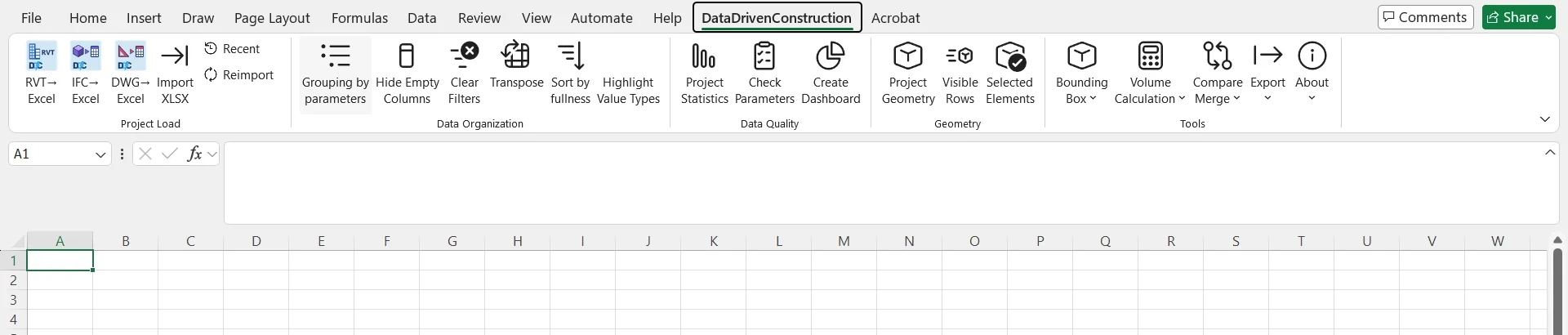
Commands on the ribbon
Import reads RVT, IFC and DWG through the DDC converters; everything after that works on the sheet.
-
01
Project load
Import a model into a sheet
- RVT to Excel
- IFC to Excel
- DWG to Excel
- Import XLSX
- Recent
- Reimport
-
02
Data organisation
Tidy wide tables
- Grouping by parameters
- Hide empty columns
- Clear filters
- Transpose
- Sort by fullness
- Highlight value types
-
03
Data quality
Checks and dashboards
- Project statistics
- Check parameters
- Create dashboard
-
04
Geometry and export
Look at the rows, hand them on
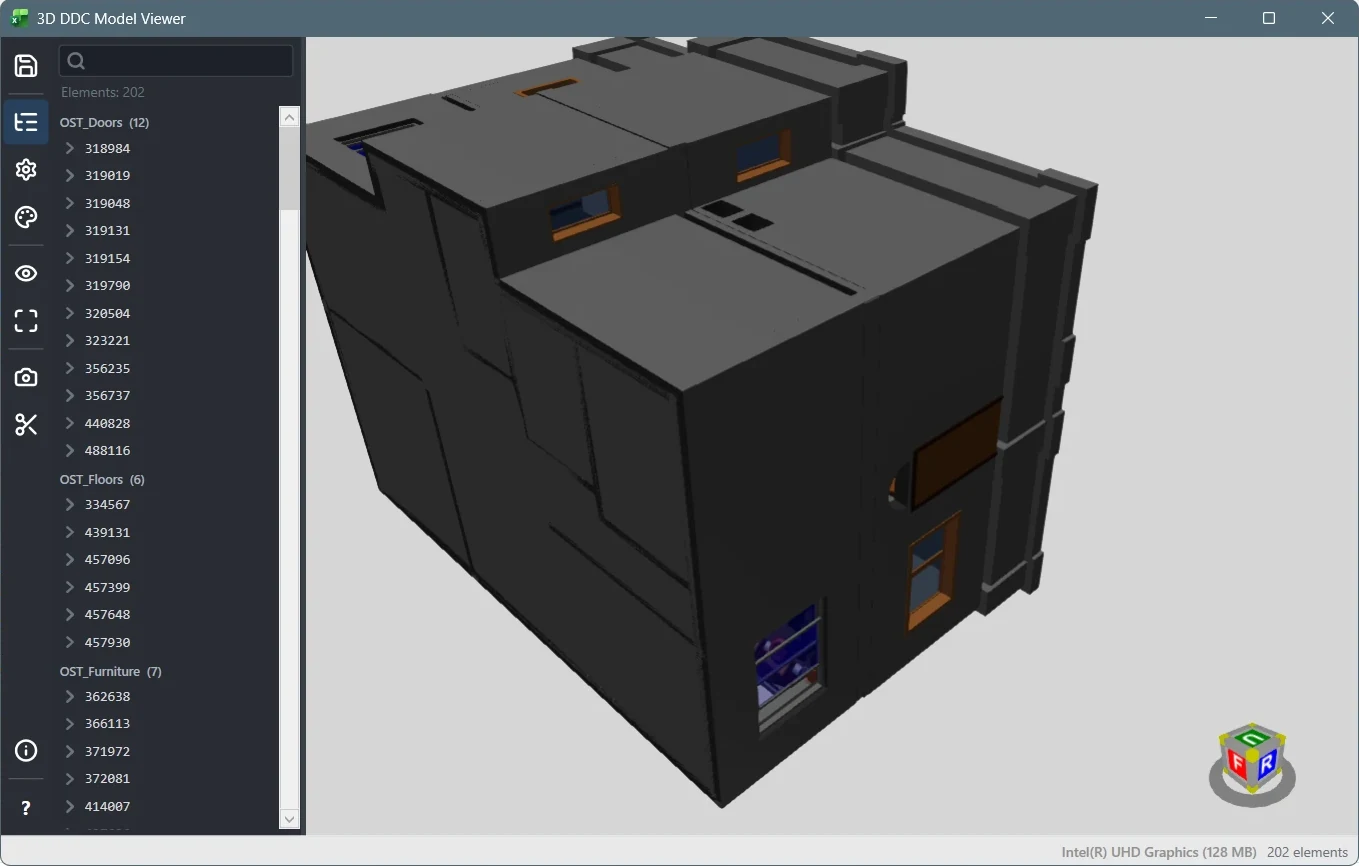
- Project geometry
- Visible rows
- Selected elements
- Bounding box
- Volume calculation
- Compare and merge
- Export
How it works
Install, import, check the hash
The converters are not inside the package. They are fetched once, after you confirm, and verified before use.
01
Install
Close Excel, unzip the package and run Install-DDC-Excel.cmd. It installs for the current Windows user only, without administrator rights. Open Excel: the DataDrivenConstruction tab is on the ribbon.
02
Import a model
Choose RVT to Excel, IFC to Excel or DWG to Excel and pick the file. The first time, the add-in asks for permission and downloads the matching converter from the DDC release on GitHub (RVT about 75 MB, IFC about 34 MB, DWG about 22 MB).
03
Hash check
Every converter is compared with a fixed SHA-256 value before it is used and stored in %LOCALAPPDATA%\DataDrivenConstruction\Excel\converters. Without internet, put the official portable zip of the release into the downloads folder next to it; it is used when the hash matches.
04
Work on the table
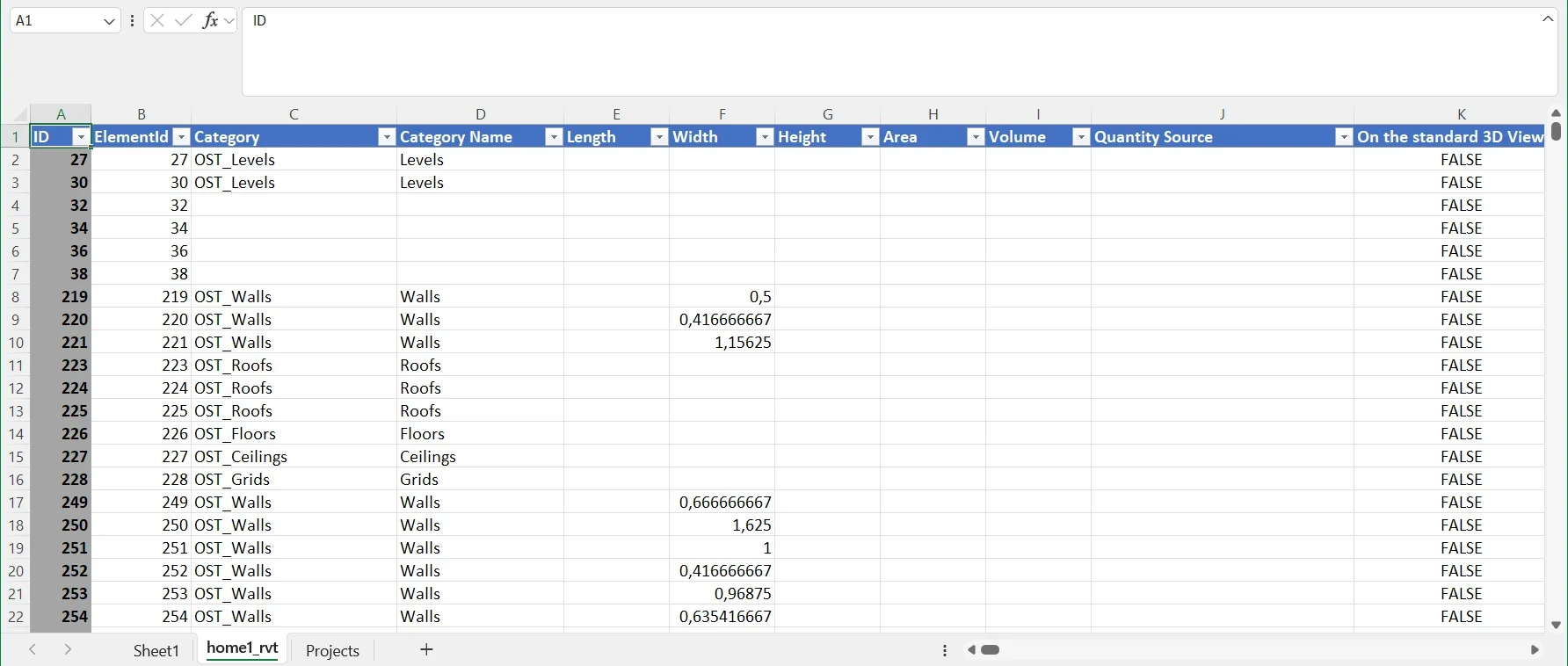
The result is a new sheet named after the file (_rvt, _ifc or _dwg), one row per element. The converter output stays in a DDC folder next to the model.
Installation
Installation and trust
What the installer changes on your computer. The package describes it in SIGNING.txt.
- Windows and Excel cannot show a verified publisher for this package.
- The installer adds the public part of the package's own manifest key to the VSTO inclusion list of the current Windows user. Nothing else is trusted: no certificate store entry, no machine-wide change.
- Uninstall-DDC-Excel.ps1 removes the add-in and that entry. With
-NoTrustthe entry is skipped and Excel refuses to load the add-in. - Check the zip before installing:
certutil -hashfile DDC-Excel-AddIn-2026.10.0-unsigned.zip SHA256must print the value below.
SHA-256 148b167eacb4bd8436b60adb7d636a96fbae0af9c39bd538a6351f81072fdcb7
Requirements and scope
Requirements and supported scope
What the add-in covers and what it does not.
- System
- Windows 10 or 11, 64-bit; Excel 2016 or newer, Microsoft 365; .NET Framework 4.8.1 and the VSTO runtime that comes with Office
- Excel limits
- 1,048,575 rows and 16,384 columns per sheet
- RVT
- Saved parameter values, no formulas, Revit internal units. Category, family and type names are not in the RVT table (they need the IFC export). Volume and Area come from the mesh.
- IFC
- No geometry. Quantities are the values stored in the file.
- DWG
- One row per drawing record as written by DWG to Excel; coverage columns say what was converted.
- Not supported
- DGN, Excel for Mac, Excel on the web
- Package
- DDC-Excel-AddIn-2026.10.0-unsigned.zip (4.3 MB)
Questions
Questions about the add-in
Short answers, including the ones that are no. Where we do not do something, we say what works instead.
All questionsWhy does the installer add a trust entry?
VSTO add-ins need signed manifests. The package is signed with its own key that Windows does not trust by default, so Excel cannot show a verified publisher. The installer adds the public part of that key to the per-user VSTO inclusion list (HKCU), which is the only trust it grants; the uninstaller removes it. Run the installer with -NoTrust to skip this, but Excel will then refuse to load the add-in.
How do I verify the download?
Compare the SHA-256 of the zip with the value shown on this page and in the release notes on GitHub: certutil -hashfile DDC-Excel-AddIn-2026.10.0-unsigned.zip SHA256.
How many columns can a sheet hold?
Excel allows 1,048,575 rows and 16,384 columns per sheet. A model with more parameters than that cannot be shown in one sheet.
Which Excel versions work?
Excel 2016 or newer and Microsoft 365 for Windows, on Windows 10 or 11 (64-bit), with .NET Framework 4.8.1 and the VSTO runtime that comes with Office. There is no Mac or Excel-on-the-web version.
Do I need Revit or CAD software?
No. The add-in uses the DDC converters to read RVT, IFC and DWG files. They are downloaded once, after you confirm.
Is it free?
It is distributed under the DataDrivenConstruction EULA included in the package. Companies may use it for up to 10 conversions a month for free; above that a licence is needed: see the licence page.
Free Community version
Your model data, inside Excel
For Excel 2016 or newer on Windows 10/11. The converters are downloaded once, after you confirm.
4.3 MBWindows 10/11 x64Excel 2016 or newer
Licence for the add-in?
- E-mailinfo@datadrivenconstruction.io
- FormContact form
- CallBook a call
Artem Boiko or an engineer from the DDC team replies by e-mail.